Brink
Your Notion pages and tasks, one hover away on your Mac
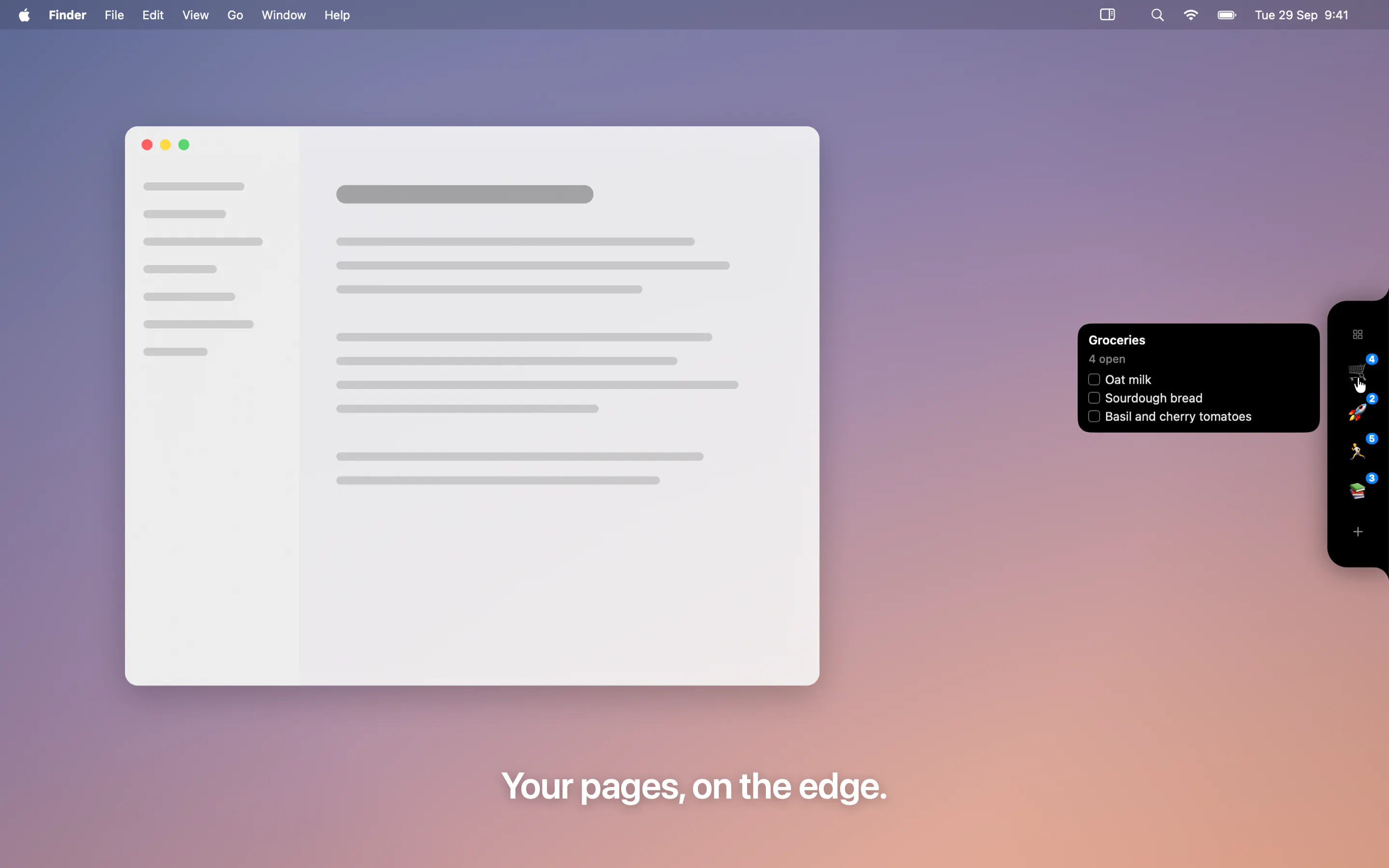
Brink is a quiet black notch on your Mac's screen edge. Hover it to peek at your Notion pages and tasks, tick things off in place, capture a task from any app with a hotkey, and see what's due today. Free and open source.
AI Analysis
Brink is a minimal Mac utility that appears as a subtle black notch on the screen edge. Hovering over it provides instant access to Notion pages and tasks, enabling users to view content, complete tasks inline, capture tasks from any app via global hotkey, and check daily due items. As a free and open-source tool, it solves key pain points like constant app switching, fragmented workflows, and inefficient task management for Notion users. Its value proposition centers on unobtrusive, always-available productivity enhancement directly within the Mac desktop environment without any subscriptions.
In 2025-2026, Notion remains a dominant productivity platform with growing demand for native Mac integrations and ambient computing experiences. Trends favor lightweight, open-source tools that reduce context switching amid hybrid work and AI-assisted workflows. macOS ecosystem is mature for such utilities, and economic conditions support productivity software adoption. This is a strong period for innovative desktop enhancements. Excellent Timing.
Technical implementation involves moderate difficulty with macOS development (Swift/Objective-C) and Notion API integration. As an open-source project, development and operation costs are low with potential community support. No major supply chain or compliance risks for desktop software. Strong scalability via Notion's cloud infrastructure and good fit for indie developers. Overall High with main risks around API changes and macOS updates.
Primary users: Tech professionals, developers, product managers, and students aged 25-40 who are heavy Notion users on Mac. Concentrated in North America, Europe, with growing adoption in Asia. TAM for global productivity software exceeds $100B; SAM for Notion ecosystem tools approx. $500M-$1B; SOM for this Mac-specific utility approx. $5-10M. Core pain points include inefficient access and task fragmentation. Willingness to pay is moderate; users often support via GitHub sponsorships despite the free model.
Medium. Direct competitors: 1. Raycast (raycast.com) with Notion extensions, 2. Alfred (alfredapp.com) with custom workflows, 3. Notion official desktop app (notion.so), 4. MenuBar apps like 'Notion Menu Bar' on GitHub, 5. Linear (linear.app) for task management. Advantages: Unique non-intrusive hover notch UI, fully free/open source, seamless inline editing. Disadvantages: Narrower feature set than commercial tools, potential API limitations, less marketing/support than established competitors.
Upgrade Pro to unlock full AI analysis
Similar Products
CodeBurn
See where your AI coding spend actually goes
▲ 101 votes

Juggler
A visual AI coding harness
▲ 94 votes

Kosshi
Simple, fast outliner for Mac and iPhone.
▲ 90 votes

gg-friggin-ez
Fast, cheap profanity and toxicity screening via Jev & Laya
▲ 88 votes
Blop
Describe your app and Blop tests it and repairs broken tests
▲ 80 votes

Prowler Cloud
Where your AI agent becomes a cloud security defender
▲ 64 votes