
Chimlo
Track Codex and Claude Code and respond from your Notch
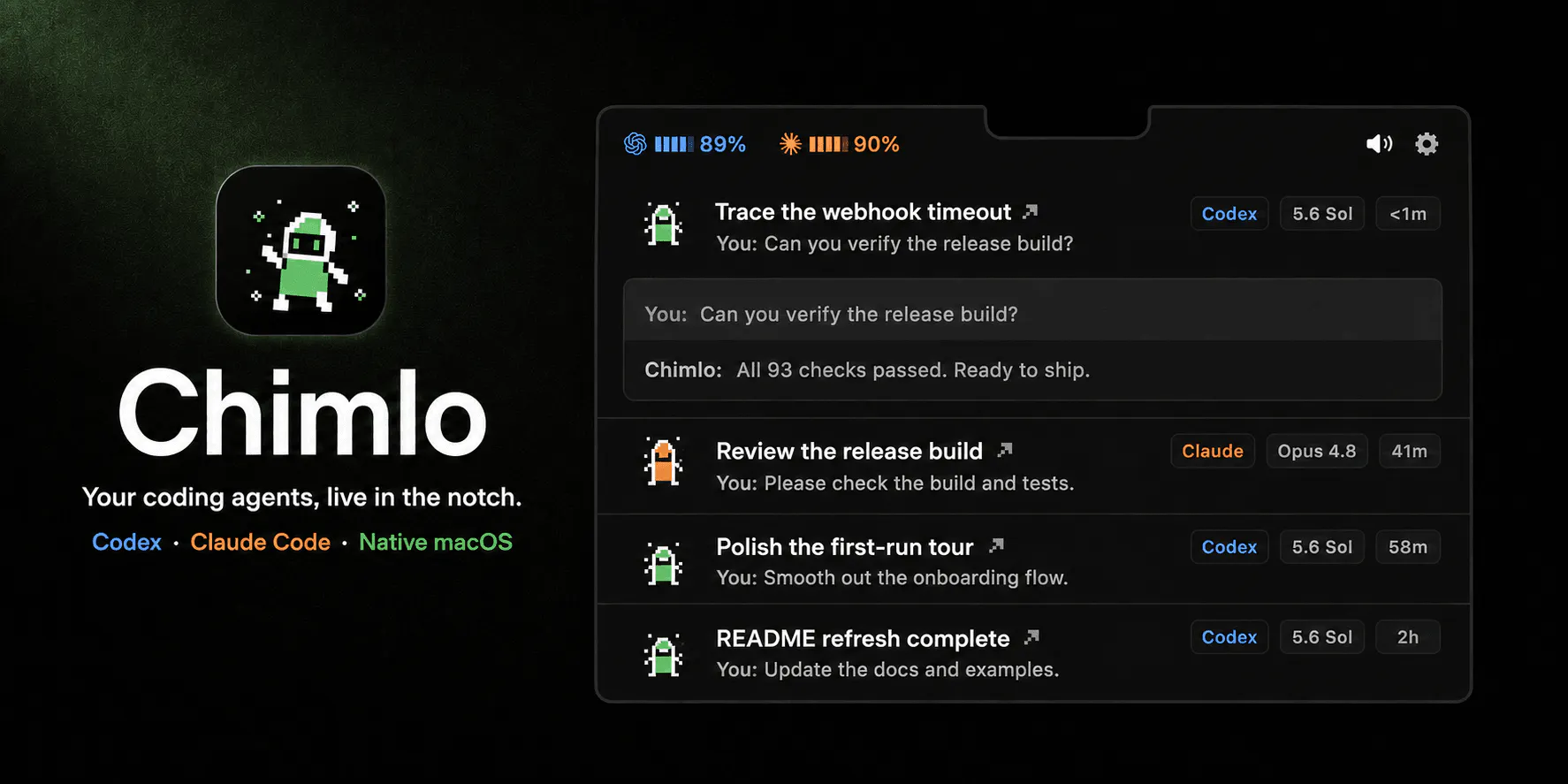
Chimlo is a free, open-source macOS app that puts Codex and Claude Code in your MacBook notch. See which agents are working, waiting, finished, or failed. Answer Claude Code questions, review permission requests, and check provider usage without hunting through terminal windows. Chimlo also handles media, volume, and brightness controls, with animated pixel companions that make every state easy to spot.
AI Analysis
Chimlo is a free, open-source macOS menu bar app that integrates Codex and Claude Code into the MacBook notch for visual tracking of AI agent statuses (working, waiting, finished, failed) using animated pixel companions. Core features include responding to Claude questions, reviewing permissions, monitoring provider usage, and handling media/volume/brightness controls without switching to terminals. It solves key pain points of fragmented AI coding workflows, context switching, and hard-to-monitor background processes. The value proposition is a fun, glanceable, seamless developer experience that combines AI agent oversight with system utilities in one innovative interface.
In 2025-2026, AI coding agents and tools like Claude are reaching high maturity with surging developer adoption. User demand for intuitive, non-terminal interfaces is growing rapidly amid the agentic AI trend. macOS ecosystem favors innovative productivity apps, with favorable economic conditions for open-source dev tools. This aligns perfectly with the boom in AI-assisted development. Excellent Timing.
Technical difficulty is medium as it uses established macOS APIs for notch/menu bar, AI API integrations, and system controls. Development and operation costs are low since it is free and open-source. Minimal supply chain or compliance risks for a desktop app. High scalability for additional AI tools. Suitable for small teams with macOS expertise. Overall High feasibility.
Main target: Software developers, AI engineers, and indie hackers aged 25-40 using MacBooks for coding with Claude/OpenAI tools. Industries: Software development and tech startups. Geographic: Primarily North America and Europe with high Mac adoption. Estimated TAM for AI dev tools ~$5-10B, SAM for Mac productivity apps ~$500M, SOM ~50K-100K users. Core pain points: Inefficient terminal-based AI management. High willingness to pay for productivity enhancements via donations, premium tiers, or related services.
Competition level: Low. The specific notch integration for AI code agents with visual companions is highly differentiated. Direct competitors: 1. Raycast (raycast.com) - extensible menu bar with AI features. 2. Warp (warp.dev) - AI-powered terminal replacement. 3. Aider (aider.chat) - CLI tool for paired AI coding. 4. Continue (continue.dev) - open-source autopilot for VS Code. Advantages: Unique visual notch UI, combined system controls, completely free/open-source. Disadvantages: Mac-only (notch required), narrower scope than full IDE plugins, relies on existing AI backends.
Upgrade Pro to unlock full AI analysis
Similar Products
buddylist
Chat with your coding agents like it's 2005
▲ 114 votes
CodeBurn
See where your AI coding spend actually goes
▲ 101 votes

Thoughts for Mac
Capture notes from your menubar using text, images or voice
▲ 90 votes

Refoid
Automate App Store refund responses and track every outcome
▲ 68 votes

Patchcord
Studio sound for your mic in every Mac meeting with EQ
▲ 64 votes

Poddle
Swing your phone, play pickleball on any computer!
▲ 62 votes