
Gretl
Visual control pannel for localhosts
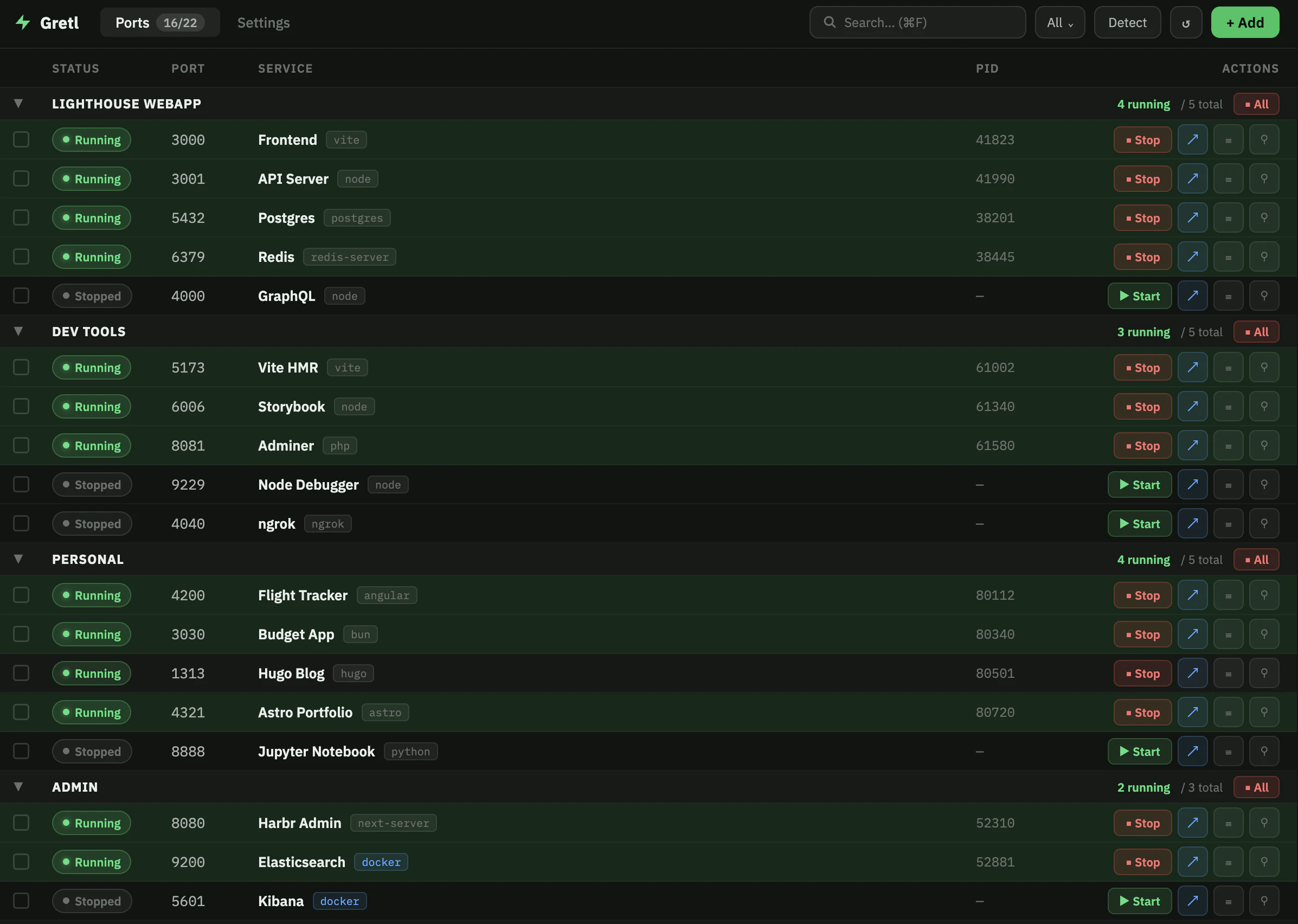
Gretl is a port manager for developers. It sits in your menu bar, watches every port on your machine, and lets you name, group, start, stop, and share them — so "what's running on 3001?" is never a mystery. Works standalone or alongside your existing tools. Ships with a CLI (gr list, gr start), a Python/Ruby/Node SDK, and a gr.toml you can commit so teammates get the same setup automatically.
AI Analysis
Gretl is a port manager for developers that provides a visual control panel in the menu bar. It monitors every port on your machine, enabling users to name, group, start, stop, and share localhost services. It solves key pain points like uncertainty over running services (e.g., 'what's on 3001?'), fragmented local dev setups, and inconsistent team environments. Core features include a CLI (gr list, gr start), SDKs for Python/Ruby/Node, and a commit-able gr.toml config for automatic teammate onboarding. As an open-source tool, it integrates with existing workflows while offering standalone utility. The value proposition is eliminating localhost mysteries, boosting productivity, and streamlining collaboration for smoother development cycles.
In 2025-2026, with the surge in AI-powered local development, microservices, containerization, and distributed remote teams, the demand for intelligent localhost management tools is rising. Port monitoring tech is mature, user frustration with dev environment chaos persists, and economic pressures favor productivity-enhancing open-source tools. No major regulatory hurdles for dev tools. This aligns perfectly with trends toward standardized, shareable local setups. Excellent Timing.
Technical difficulty is medium: menu bar app, port monitoring, CLI/SDK integration are achievable with established frameworks (e.g., Electron, Tauri). Development and operation costs are low as it's open-source with GitHub community support. Minimal supply chain or compliance risks for a developer productivity tool. Strong scalability potential via cloud sharing features. Team fit is high for dev-focused creators. Overall High feasibility with few barriers.
Primary users: software developers, full-stack engineers, DevOps professionals, and indie hackers (ages 22-45) working on web/mobile/AI apps. Industries: software development, tech startups, IT services. Geographic: global, concentrated in US, Europe, China, India tech hubs. TAM for developer tools ~$10B+, SAM for local dev management ~$500M, SOM for this niche ~$50M. Core pain points: port confusion, setup onboarding friction, service management overhead. Willingness to pay: moderate; open-source appeals to individuals, teams may pay for premium support or advanced sharing.
Medium. Direct competitors: 1. ngrok (ngrok.com) - tunneling and exposure focus. 2. Localtunnel (localtunnel.me) - simple localhost sharing. 3. Docker Desktop (docker.com/products/docker-desktop) - container port management. 4. Portainer (portainer.io) - container visualization. 5. OrbStack (orbstack.dev) - local dev environment tool. Gretl's advantages: menu bar simplicity, naming/grouping, gr.toml for teams, multi-language SDKs, and open-source flexibility. Disadvantages: less brand recognition, narrower scope than Docker, potentially fewer enterprise features. Strong differentiation in visual port control and team config sync.
Upgrade Pro to unlock full AI analysis
Similar Products

Opaline
PostHog for team Claude Code and Codex sessions.
▲ 141 votes

Adapt
The company brain that gets work done
▲ 124 votes

Replay QA Security Scan
Automated Penetration Testing for AI-Built Apps
▲ 102 votes

Kosshi
Simple, fast outliner for Mac and iPhone.
▲ 90 votes

Thoughts for Mac
Capture notes from your menubar using text, images or voice
▲ 90 votes

Refoid
Automate App Store refund responses and track every outcome
▲ 68 votes