
Keytones
Distinct key sounds for uppercase, lowercase & more
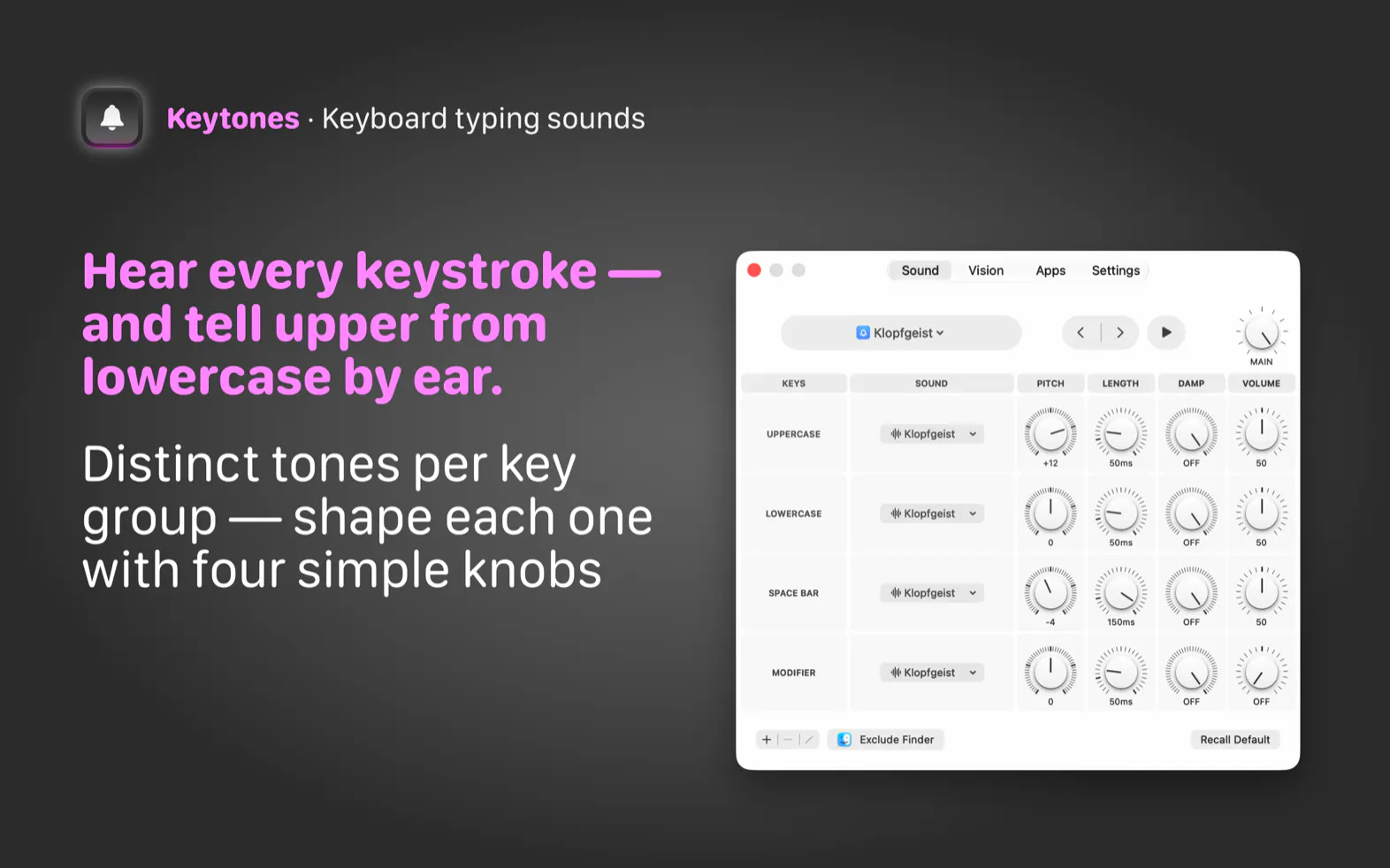
Ever typed a whole sentence in caps before noticing? Keytones plays a distinct sound for each key group (uppercase, lowercase, space bar, and modifiers) so your ears catch a stray Caps Lock before your eyes do. Tune Pitch, Length, Damping + Volume per group, import your own sounds, or, if audible feedback isn't an option, turn on Visual Feedback: a glowing screen edge that pulses with every keystroke. Per-app control, Siri + Shortcuts, instant triple-tap mute. One-time purchase, no subscription.
AI Analysis
Keytones is a macOS menu bar app that plays distinct sounds for uppercase, lowercase, space bar, and modifier keys to alert users to typing errors like accidental Caps Lock before they notice visually. Core features include customizable pitch, length, damping, and volume per key group, custom sound imports, optional visual feedback via glowing screen edges, per-app controls, Siri/Shortcuts integration, and triple-tap mute. It solves the pain of unnoticed case errors during typing. The value proposition is enhanced typing awareness and UX through audio (or visual) cues with a one-time purchase and no subscription.
For 2025-2026, market timing is favorable due to continued growth in the Apple ecosystem, focus on accessibility features, productivity tools for remote/hybrid workers who type extensively, and demand for non-visual feedback mechanisms amid rising screen fatigue. However, advances in AI voice-to-text may slightly dampen demand for typing aids. Overall, it aligns well with maturing macOS app trends and user demand for personalized UX enhancements. Rating: Moderate Timing.
Technical difficulty is medium as it requires keyboard event monitoring, audio synthesis/playback, and menu bar integration on macOS using established APIs like Swift and AVFoundation. Development and operation costs are low for a solo or small team digital product with one-time pricing. Minimal supply chain or compliance risks (standard App Store/privacy rules). Strong scalability via digital distribution and updates. Team fit is high for experienced Mac developers. Overall rating: High.
Main target users: Tech-savvy Mac power users, programmers, writers, and professionals who type frequently (ages 25-55, primarily in US, Europe, and other developed markets). Core pain points are typing errors going unnoticed and lack of keyboard auditory feedback on modern devices. Estimated market size: TAM for macOS utilities ~$500M+, SAM for typing/UX tools ~$50M, SOM for this niche ~$1-5M. Potential willingness to pay is moderate to high for a useful one-time purchase utility.
Low. Direct competitors: 1. Karabiner-Elements (karabiner-elements.pqrs.org) - complex key customization; 2. Keyboard Maestro (www.keyboardmaestro.com) - macro/automation tool; 3. KeyCastr (github.com/keycastr/keycastr) - visual keystroke display; 4. Typinator (www.macility.com/typinator) - text expansion with some triggers. Advantages: Highly specific audio differentiation per key type, easy customization including custom sounds and visual fallback, per-app rules, simple one-time purchase. Disadvantages: Very niche appeal, limited to Mac, may not attract broad users compared to multi-feature automation tools.
Upgrade Pro to unlock full AI analysis
Similar Products

React UI Kit V7
All the chat components you need. None of the complexity
▲ 115 votes

Kosshi
Simple, fast outliner for Mac and iPhone.
▲ 90 votes

Thoughts for Mac
Capture notes from your menubar using text, images or voice
▲ 90 votes

sideOS.ai
Local AI for dictation, meetings, background tasks and more
▲ 81 votes
DevTerminal
A macOS terminal with a Run button that knows your project
▲ 71 votes

Patchcord
Studio sound for your mic in every Mac meeting with EQ
▲ 64 votes