
QuackScreen
Capture, drag, share all from the MacBook notch
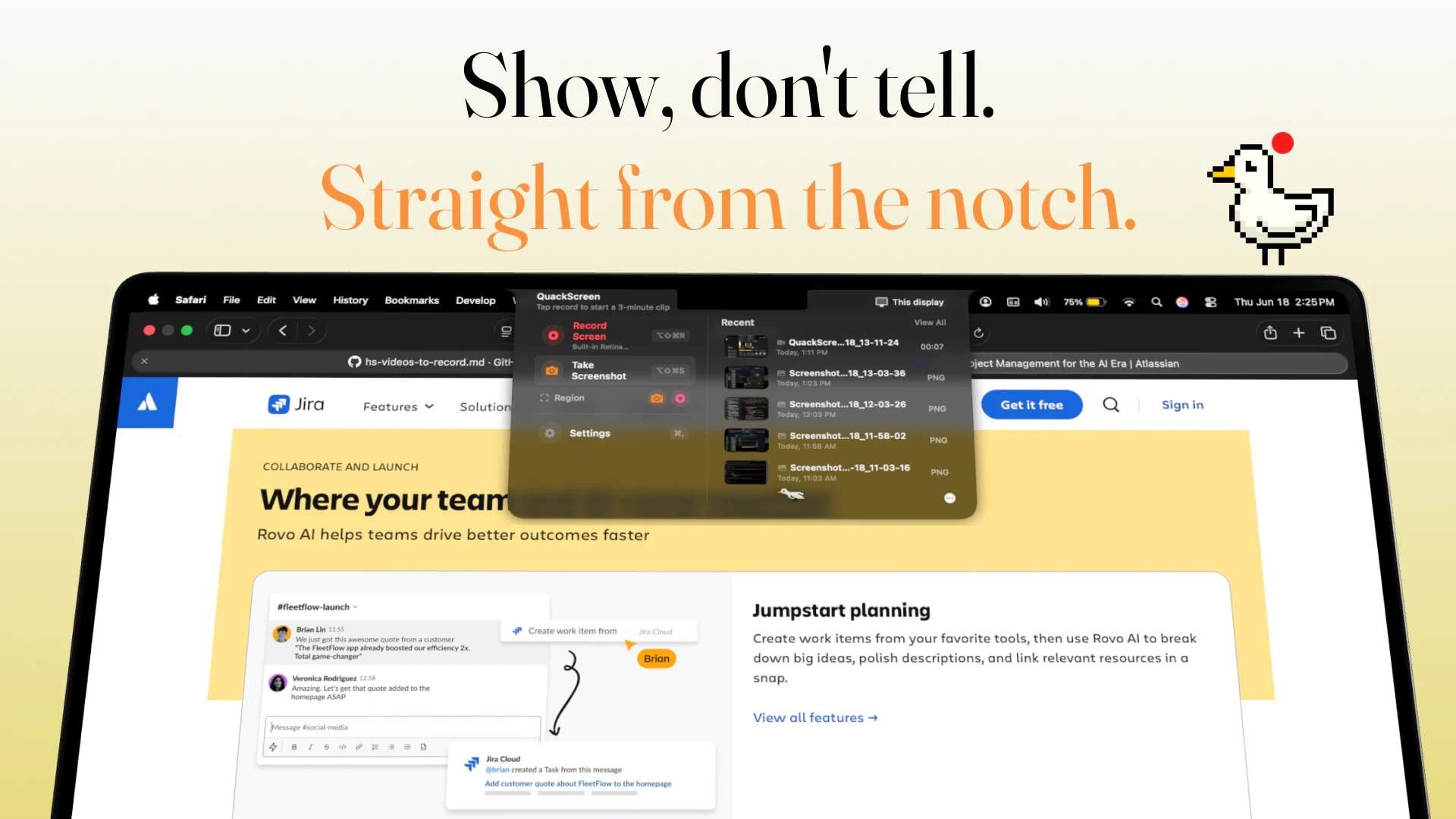
QuackScreen is a native macOS notch app for quick screen recordings and screenshots. Drag and drop clips straight from the menu bar into Slack, Mail, Finder, or any app. macOS 26+, Apple silicon.
AI Analysis
QuackScreen is a native macOS notch app for quick screen recordings and screenshots accessible from the menu bar. Core features include instant capture and the ability to drag and drop clips directly into apps like Slack, Mail, Finder or any other. It solves key user pain points of slow, fragmented workflows for capturing and sharing screen content on Mac. Unique selling point is its seamless integration with the MacBook notch and menu bar for a native, frictionless experience. Overall value proposition is enhanced productivity through instant, effortless visual content sharing for Apple silicon users.
In 2025-2026, remote collaboration and content creation trends continue to drive demand for efficient native capture tools, with mature macOS APIs and Apple's hardware features like the notch enabling innovative UX. User demands for faster sharing into communication apps are rising amid stable economic conditions for productivity software. However, the category is well-served by existing solutions. Moderate Timing.
Technical difficulty is medium, requiring macOS/Swift expertise for notch/menu bar integration, screen capture APIs and cross-app drag-drop. Development costs are reasonable for a small experienced team; operational costs low with no supply chain issues. Minimal compliance risks (App Store review). Strong scalability via App Store and updates. Overall rating: High, supported by mature ecosystem and focused scope.
Main target segments: Tech-savvy MacBook users (developers, designers, marketers, remote workers), ages 25-45, primarily in North America, Europe and other high-Mac-adoption regions. Estimated TAM for screen capture software exceeds $10B, SAM for macOS tools ~$300-500M, SOM for this menu-bar niche ~$20-50M. Core pain points: inefficient multi-step capture and sharing. High willingness to pay for time-saving native utilities ($10-50 one-time or subscription).
Competition level: Medium. Direct competitors: 1. CleanShot X (cleanshot.com), 2. Loom (loom.com), 3. Kap (getkap.co), 4. Screen Studio (screen.studio). Advantages vs competitors: Unique notch/menu bar integration and one-click drag-drop simplicity for native feel. Disadvantages: Narrower feature set (no heavy editing/annotations like CleanShot), Mac/Apple silicon only, lower brand awareness as a newer entrant facing strong incumbents with broader capabilities and cross-platform support.
Upgrade Pro to unlock full AI analysis
Similar Products
TouchGrass
Context-aware break reminders without invasive permissions
▲ 299 votes

Tidy
Rename files automatically to tidy your mac
▲ 114 votes

Kosshi
Simple, fast outliner for Mac and iPhone.
▲ 90 votes

Thoughts for Mac
Capture notes from your menubar using text, images or voice
▲ 90 votes
Whiteout
Auto-redact sensitive info from Mac screenshots
▲ 83 votes

Mantel
Stop confusing your Claude Code sessions & terminal windows
▲ 72 votes