
AndroMeld
Bring a continuity-style experience to Android and Mac
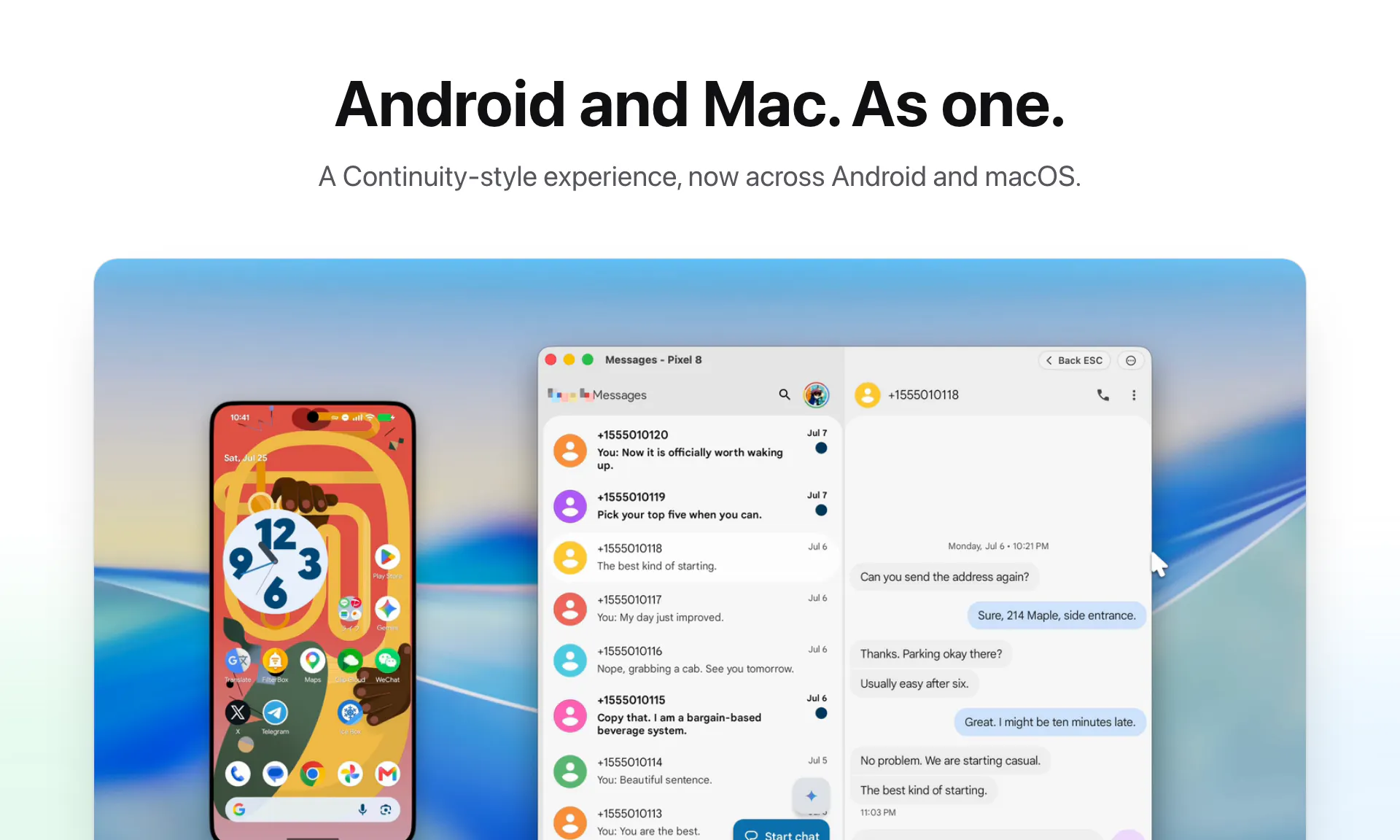
AndroMeld brings a Continuity-style experience to Android and Mac. Mirror multiple Android apps in separate, resizable, native-like Mac windows, hand off the app already open on your phone, and control it with keyboard & trackpad gestures. Browse Android storage in Finder, sync notifications and clipboard, and turn on your phone’s hotspot over Bluetooth. Support any Android 16+ devices connect by USB or Wi-Fi, with a free Web App available.
AI Analysis
AndroMeld brings a Continuity-style experience to Android and Mac users. Core features: mirror multiple Android apps in separate resizable native-like Mac windows, hand off apps from phone, control via keyboard/trackpad, browse Android storage in Finder, sync notifications/clipboard, and enable phone hotspot over Bluetooth. Supports any Android 16+ device via USB or Wi-Fi, with a free Web App available. It solves the main pain point of fragmented workflows and lack of seamless integration between Android phones and Macs. Unique selling points include native Mac window integration and multi-app mirroring. Overall value proposition is significantly improved productivity and unified device experience for cross-platform users.
In 2025-2026, market timing is favorable due to mature wireless and mirroring technologies (Wi-Fi 6E/7, improved Bluetooth), rising multi-device ownership, and persistent demand for better cross-OS productivity tools amid hybrid work trends. User demand for Android-Mac interoperability is growing as more professionals use mixed ecosystems. Economic environment supports SaaS productivity tools, though regulatory aspects for data sync remain stable. It is a good time as Android 16 features can be leveraged. Rating: Moderate Timing.
Overall feasibility is Medium. Technical difficulty is significant for implementing resizable native-like windows, gesture controls, reliable USB/Wi-Fi mirroring, and deep OS integrations (Finder, notifications, Bluetooth). Development and operation costs are moderate for a SaaS/hardware-adjacent tool. Supply chain/compliance risks are low (software-focused, but privacy compliance for notifications/sync needed). Scalability is good post-MVP, but requires specialized expertise in Android and macOS APIs. Team fit depends on cross-platform engineering experience.
Main target users: Tech-savvy Mac owners who primarily use Android smartphones, including software developers, designers, productivity-focused professionals, ages 25-45. Geographic focus: US, Europe, and East Asia where mixed Apple/Android usage is common. Industries: Technology, creative services, and remote work. Core pain points: inefficient app switching and lack of continuity features between Android and Mac. The product addresses strong demand for seamless multi-device workflows; users in this segment show high willingness to pay for productivity enhancements (based on similar tools).
Competition level: Medium. Direct competitors: 1. scrcpy (github.com/Genymobile/scrcpy), 2. AirDroid (airdroid.com), 3. Vysor (vysor.io), 4. ApowerMirror (apowersoft.com). This product's advantages: superior native Mac window integration, simultaneous multi-app support, Finder storage access, app handoff, and Bluetooth features - offering closer Continuity-like experience. Disadvantages: newer/less established, limited to Android 16+, potentially higher setup complexity compared to simpler screen mirroring tools. Differentiation is strong in Mac-specific UX but faces pressure from free/open-source alternatives.
Upgrade Pro to unlock full AI analysis
Similar Products

Adapt
The company brain that gets work done
▲ 124 votes

Tapfree for Chrome
Voice dictation that adapts to what’s on your screen
▲ 122 votes

Orus
Claude for investing in perpetuals
▲ 121 votes

Kosshi
Simple, fast outliner for Mac and iPhone.
▲ 90 votes

Thoughts for Mac
Capture notes from your menubar using text, images or voice
▲ 90 votes

Refoid
Automate App Store refund responses and track every outcome
▲ 68 votes