Barflare
Cloudflare Tunnels, managed from your menu bar
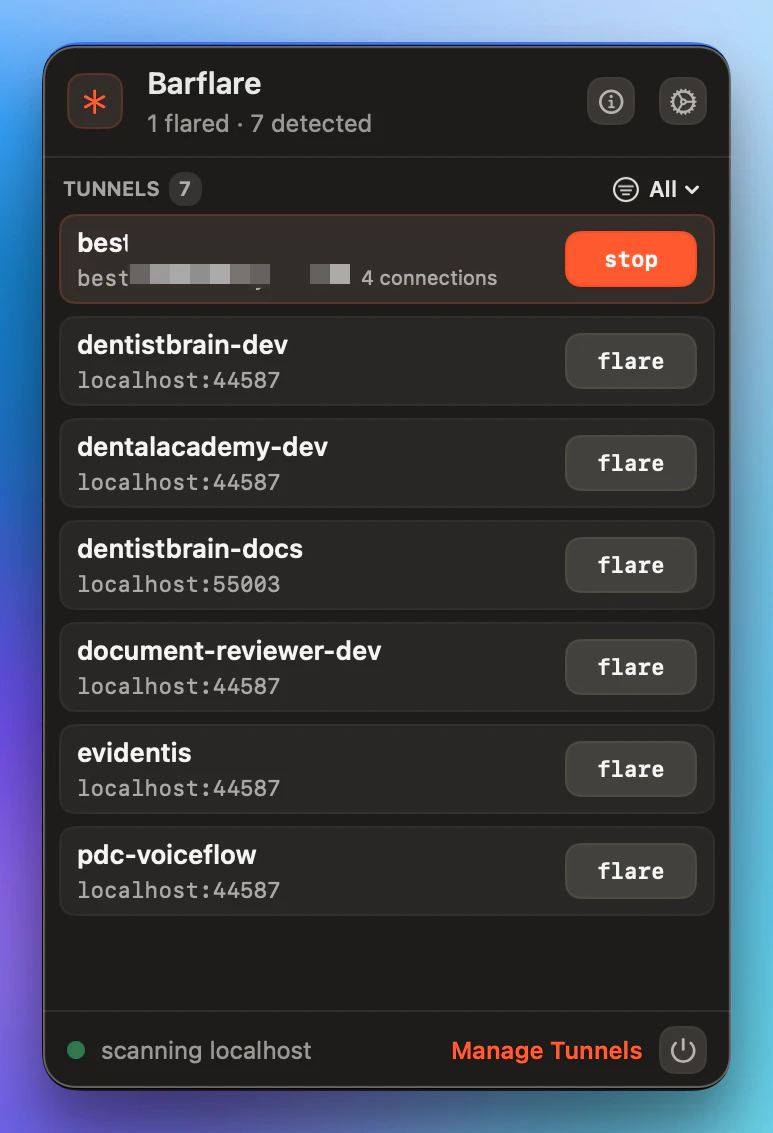
Barflare is a macOS menu bar app that finds local and Conductor dev servers, then crBarflare is a native macOS menu-bar app for developers who use Cloudflare Tunnels but don’t want to live in the terminal. Create, import, start, stop, monitor, and organise tunnels from one focused Mac interface. Barflare can discover local development servers, bind them to tunnels, show logs and live stats, manage ingress rules and access policies, and keep tunnels running with auto-start and crash recovery.
AI Analysis
Barflare is a native macOS menu bar app for developers using Cloudflare Tunnels. It enables creating, importing, starting, stopping, monitoring, and organizing tunnels without relying on the terminal. Core features include auto-discovery of local and Conductor dev servers, binding to tunnels, real-time logs and stats, management of ingress rules and access policies, plus auto-start and crash recovery. It solves key pain points like terminal complexity, lack of visibility, and manual management, delivering a focused, always-accessible interface that boosts productivity and simplifies secure local server exposure.
In 2025-2026, with rising adoption of Cloudflare's zero-trust and tunnel services, increased remote/hybrid development, and developer demand for GUI-based productivity tools over CLI, timing is favorable. Mac developer population is growing and menu bar apps are popular for quick access. Economic push for efficient dev tools supports this. Excellent Timing.
Technically feasible using Cloudflare APIs and standard macOS development frameworks (likely Swift). Moderate development costs for a focused desktop app; low operational costs with potential for auto-updates. Minimal supply chain risks, standard compliance for developer tools. Strong scalability via freemium model. Overall High feasibility with low barriers for an experienced solo developer or small team.
Primary users: macOS-based software developers, web engineers, and DevOps professionals who use Cloudflare Tunnels for local dev server exposure. Industries: Software development, tech startups, web services. Geographic focus: North America, Europe, Asia tech hubs. TAM for dev productivity tools is large ($10B+); SAM for Cloudflare-related tools ~$100M; SOM for menu bar niche ~$5-10M. Pain points: CLI complexity and poor monitoring. High willingness to pay ($4-10/mo) for time-saving convenience.
Low. Direct competitors: 1. Official Cloudflare CLI (cloudflared, developers.cloudflare.com), 2. ngrok Desktop App (ngrok.com), 3. Open-source Cloudflare Tunnel GUI projects on GitHub, 4. Termius or similar terminal alternatives. Advantages: Native menu bar UX, auto server discovery, integrated stats/logs, crash recovery - superior Mac integration vs CLI tools. Disadvantages: macOS-only, potentially higher price than free CLI, newer entrant with less ecosystem.
Upgrade Pro to unlock full AI analysis
Similar Products

Opaline
PostHog for team Claude Code and Codex sessions.
▲ 141 votes

Replay QA Security Scan
Automated Penetration Testing for AI-Built Apps
▲ 102 votes

Thoughts for Mac
Capture notes from your menubar using text, images or voice
▲ 90 votes

Audryo
Customer email your agent can operate.
▲ 68 votes

Refoid
Automate App Store refund responses and track every outcome
▲ 68 votes
Patchcord
Studio sound for your mic in every Mac meeting with EQ
▲ 64 votes