CTRL Micro
Haptic control deck for your Mac and AI agents
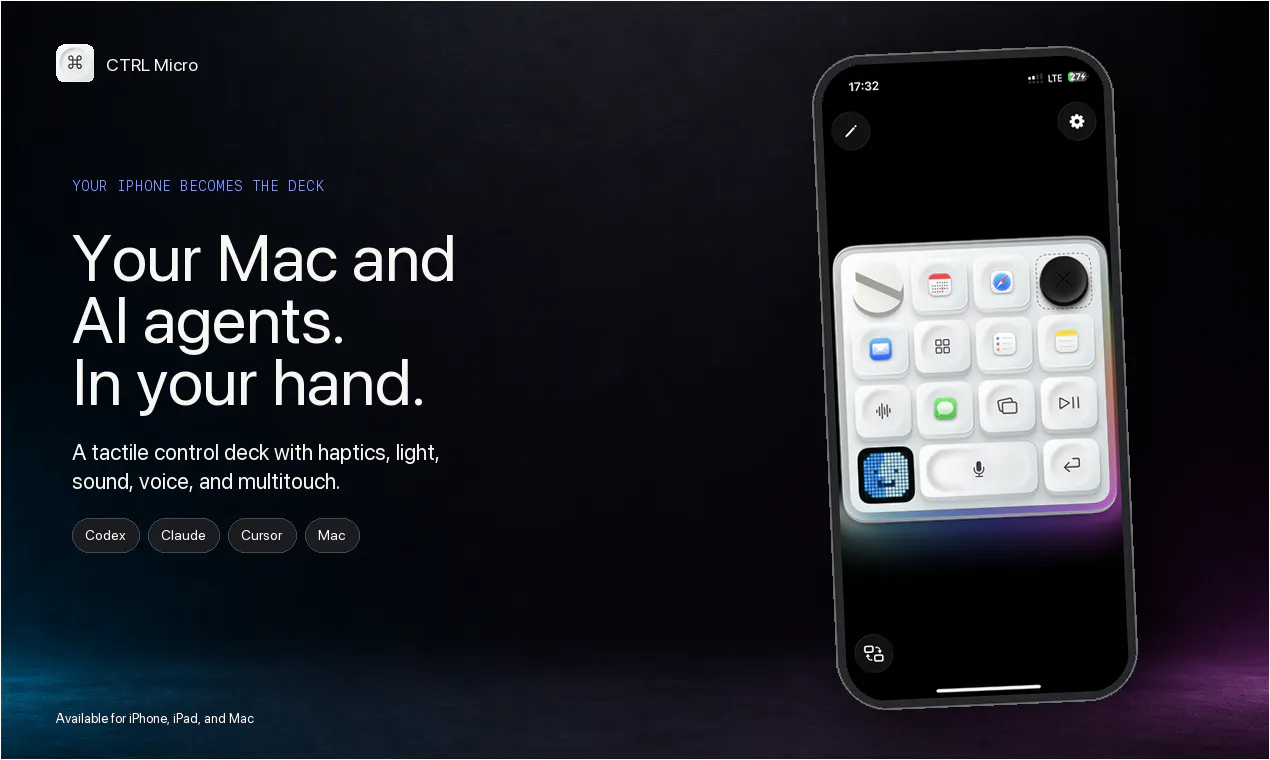
Codex Micro ran out of stock, so we built one for your phone using Apple Taptic Engine. Turn your iPhone or iPad into a tactile control deck for your Mac. Monitor Codex, Claude, and Cursor, open a live Desktop View, use Trackpad and Keyboard, and dictate locally using Whisper. Works nearby or through end-to-end encrypted Remote Anywhere. You can also build your own custom controls to make the deck work on any app you want. Give it a try and keep your agents in sight from anywhere.
AI Analysis
CTRL Micro turns your iPhone or iPad into a haptic control deck for Mac and AI agents by leveraging the Apple Taptic Engine. Core features include monitoring tools like Codex, Claude, and Cursor, live Desktop View, trackpad/keyboard input, local dictation powered by Whisper, and the ability to build custom controls for any app. It supports nearby use or remote access via end-to-end encrypted connections. It solves pain points of hardware unavailability (following Codex Micro stock issues), lack of tactile feedback when managing AI agents, and the need for seamless portable control. The value proposition is boosting productivity by keeping AI agents visible and controllable from anywhere with a tactile mobile experience.
In 2025-2026, AI agents and tools like Claude and Cursor are seeing explosive growth, on-device AI models such as Whisper have matured, and remote/hybrid work demands portable control solutions. Mac users in tech and creative fields increasingly seek integrated AI workflows. Economic focus on productivity tools and favorable privacy regulations for encrypted tech support adoption. This aligns perfectly with rising demand for haptic and mobile-first AI interfaces. Excellent Timing.
Technical difficulty is moderate: leverages mature Apple APIs, open Whisper models, and standard encryption, but real-time monitoring of specific AI apps and custom control builder add complexity. Primarily software-based, so low supply chain and hardware costs; main risks are App Store compliance and maintaining low-latency remote connections. Scalable as a digital product with high potential for updates. Suitable for teams experienced in iOS/Mac development. Overall High feasibility.
Primary users: Mac-based developers, AI researchers, productivity enthusiasts, and creative professionals (ages 25-45), concentrated in US, Europe, and Asia tech hubs. Industries include software engineering, content creation, and AI development. TAM for AI productivity software exceeds $15B, SAM for Mac accessory/control apps around $2B, SOM for haptic/AI remote tools ~$100M+. Core pains: inefficient AI agent oversight, device switching friction, and missing tactile feedback. High willingness to pay for premium, specialized tools via subscriptions or in-app purchases.
Medium. Direct competitors: 1. Elgato Stream Deck (elgato.com) - physical macro pad. 2. Astropad Luna (astropad.com) - iPad as Mac display/control. 3. Apple's Sidecar (apple.com) - native iPad secondary display. 4. Touch Portal (touch-portal.com) - mobile deck for macros. 5. Jump Desktop (jumpdesktop.com) - remote desktop app. Advantages: unique Apple Taptic haptics, deep AI agent integrations (Claude/Cursor), local Whisper dictation, fully custom controls, and E2EE remote. Disadvantages: depends on existing iOS device (no dedicated hardware), potential latency issues vs native solutions, narrower scope than general remote tools.
Upgrade Pro to unlock full AI analysis
Similar Products

Cohere Parse 5
Turn complex docs, tables & images into AI-ready data
▲ 158 votes

Opaline
PostHog for team Claude Code and Codex sessions.
▲ 141 votes

Adapt
The company brain that gets work done
▲ 124 votes

Kosshi
Simple, fast outliner for Mac and iPhone.
▲ 90 votes

WikiFix for Confluence
Find and fix issues in your knowledge base
▲ 86 votes

Refoid
Automate App Store refund responses and track every outcome
▲ 68 votes