
DockFlow
Save, switch, and automate Dock layouts for every workflow
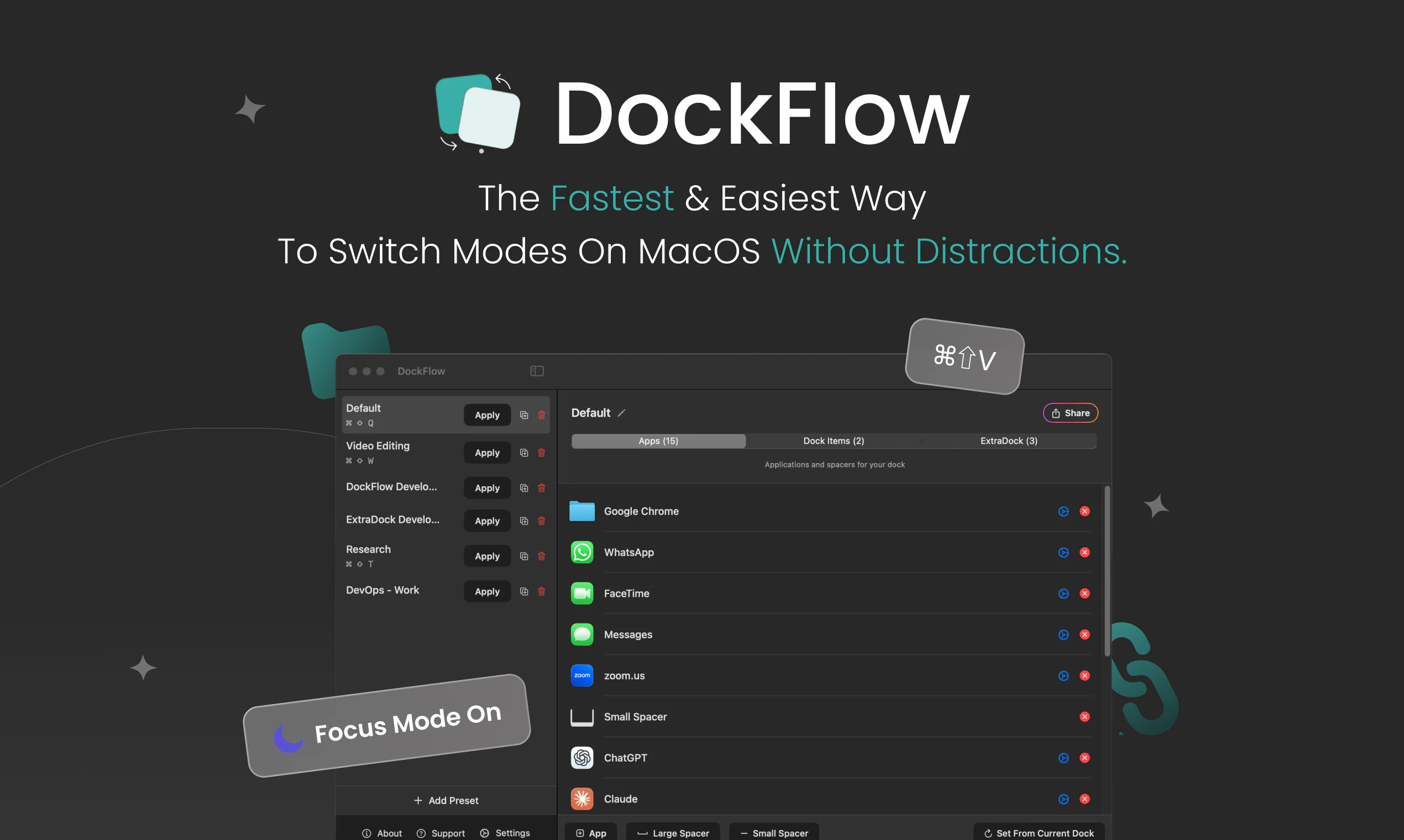
DockFlow is a Dock utility that lets you save and swap between different macOS Dock presets. Set up one for design, another for coding, another for writing. One click to switch, close the apps you don't need, and open the ones you do. I built this because I kept wasting the first few minutes of every session dragging icons back into place before I could actually work. Now I pick my context, and I'm already in my workflow. A year and 70 updates in, over 1,000 people use it.
AI Analysis
DockFlow is a macOS Dock utility that enables users to save, switch, and automate multiple Dock presets tailored to specific workflows like design, coding, or writing. Key features include one-click layout switching, automatic app closure for irrelevant tools, and launching of needed applications. It directly addresses the pain of manually rearranging Dock icons and managing apps at the start of every work session, which wastes the first few minutes of productivity. The USP is its context-aware automation that lets users instantly enter their desired workflow. The value proposition is streamlined productivity for Mac users through seamless workspace transitions, backed by 70 updates and 1,000+ users.
For 2025-2026, market timing is favorable due to sustained demand for productivity enhancements in hybrid and multi-context work environments. Technology for macOS utilities is mature, user expectations for workflow automation are rising with AI integration trends, and economic pressures encourage efficiency tools. While AI agents may evolve to handle more tasks, niche system-level utilities like this remain relevant for immediate productivity gains. Overall, it is a good time. Rating: Moderate Timing.
Overall feasibility is high. Technical difficulty is manageable using established macOS APIs for Dock and app management, as proven by the existing product with 70 updates. Development and operation costs are low for an indie SaaS-style tool. Minimal supply chain or compliance risks as it's pure software. Strong scalability potential via updates, cloud sync for presets, or subscription models. Team fit appears excellent given the solo builder's focus and user validation. Rating: High.
Main target segments: Tech-savvy macOS professionals including developers, designers, writers, and knowledge workers who manage multiple workflows (ages 25-45, primarily in North America and Europe). Industries: Technology, creative design, content creation. Estimated market size: Niche within macOS productivity tools (TAM for Mac utilities large, SAM for workflow tools in tens of millions USD, SOM several million USD given 1000+ current users). Core pain points: Time wasted setting up Docks and apps per context. Potential willingness to pay: Moderate to high for convenient, time-saving utilities (likely one-time purchase or affordable subscription).
Competition level: Low. Direct competitors: 1. cDock (https://github.com/MacEnhance/cDock), 2. uBar (https://www.brawery.com/ubar), 3. TotalSpaces (https://totalspaces.binaryage.com/), 4. Keyboard Maestro (https://www.keyboardmaestro.com/main/). This product's advantages: Highly specialized in Dock presets with auto app open/close for workflows, simple one-click UX, frequent updates. Disadvantages: Mac-only limiting reach, smaller scale vs. broader automation tools like Keyboard Maestro, lacks extensive integrations. Strong differentiation in niche focus reduces direct pressure.
Upgrade Pro to unlock full AI analysis
Similar Products

Adapt
The company brain that gets work done
▲ 124 votes

Coarena by Coasty
The arena where agents battle on real-world work
▲ 104 votes

Kosshi
Simple, fast outliner for Mac and iPhone.
▲ 90 votes

Thoughts for Mac
Capture notes from your menubar using text, images or voice
▲ 90 votes

WikiFix for Confluence
Find and fix issues in your knowledge base
▲ 86 votes

Refoid
Automate App Store refund responses and track every outcome
▲ 68 votes