Glideo
Screen recordings that edit themselves
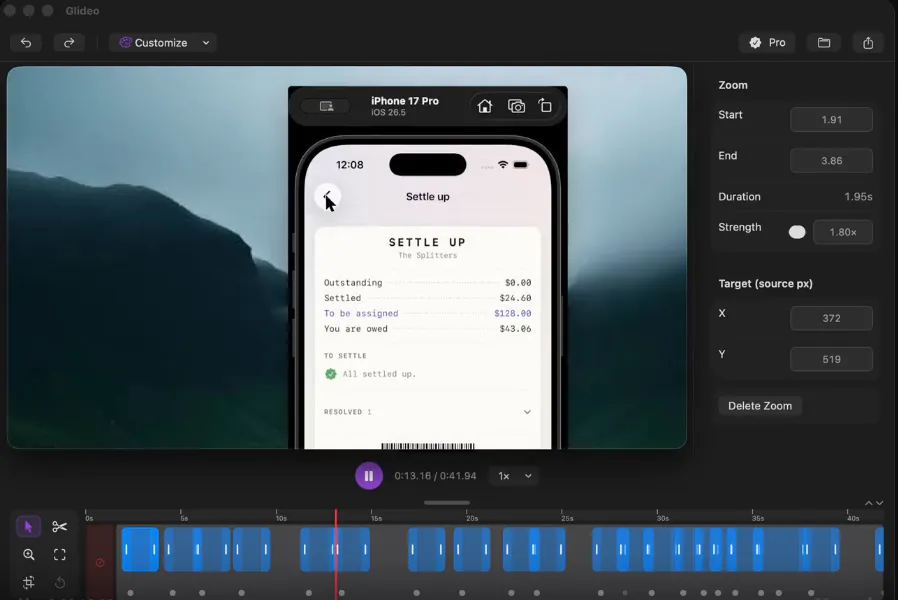
Glideo is a free macOS screen recorder built for product demos and dev tools. It turns raw screen recordings into polished demo videos: the camera zooms toward your clicks automatically, with no keyframing. Same automatic zoom that follows your clicks and cursor. Same polished output. Same "this looks way better than a raw screen recording" result, without a price tag. No trial. No watermark. No catch.
AI Analysis
Glideo is a free macOS screen recorder designed for product demos and developer tools. Its core feature automatically zooms the view toward clicks and cursor movements in raw screen recordings, producing polished demo videos without any manual keyframing or editing. It solves key user pain points: unprofessional-looking raw recordings and the significant time/effort required for post-production to make videos presentable. The unique selling points are its intelligent auto-editing, completely free access with no trials, watermarks, or restrictions. The overall value proposition is enabling developers and designers to quickly create high-quality, professional-looking demos that appear far superior to basic screen captures.
In 2025-2026, market timing is favorable due to surging AI-powered automation in video/content creation, rising demand for efficient product demos amid SaaS growth and remote workflows, and mature macOS APIs/computer vision tech for cursor tracking. User needs are shifting toward zero-effort professional outputs as video becomes central to developer marketing and documentation. Excellent Timing.
Technical implementation uses accessible macOS screen recording and event APIs, making auto-zoom feasible though it requires precise click detection and smooth video processing. Development and operation costs are low-to-medium for a desktop app with no hardware dependencies. Minimal compliance risks; strong scalability as a digital download. Already launched successfully as free software. Overall rating: High.
Main target segments: Software developers, UX/UI designers, and product managers using macOS, primarily in the tech/SaaS industry, with strong presence in North America and Europe. The screen recording and demo tools market has substantial demand (TAM in billions for video software). Core pain points are time wasted on editing and lack of professional polish in raw captures. Users in this space demonstrate high willingness to pay for time-saving tools, though the free model broadens accessibility.
Medium. Direct competitors: Loom (loom.com), ScreenFlow (telestream.net/screenflow), Camtasia (techsmith.com/camtasia), Kap (getkap.co), CleanShot X (cleanshot.com). Advantages: Completely free with no limits, unique automatic click-following zoom that requires zero manual effort, focused simplicity for polished demos. Disadvantages: macOS-only (vs cross-platform competitors), may lack advanced manual editing/cloud sharing features of Loom or Camtasia. Strong differentiation through its 'edits itself' approach for demo videos.
Upgrade Pro to unlock full AI analysis
Similar Products

Opaline
PostHog for team Claude Code and Codex sessions.
▲ 141 votes

React UI Kit V7
All the chat components you need. None of the complexity
▲ 115 votes

Replay QA Security Scan
Automated Penetration Testing for AI-Built Apps
▲ 102 votes
CodeBurn
See where your AI coding spend actually goes
▲ 101 votes

Audryo
Customer email your agent can operate.
▲ 68 votes

Refoid
Automate App Store refund responses and track every outcome
▲ 68 votes