
GlowPulse
Your Mac's camera is now a heart-rate sensor
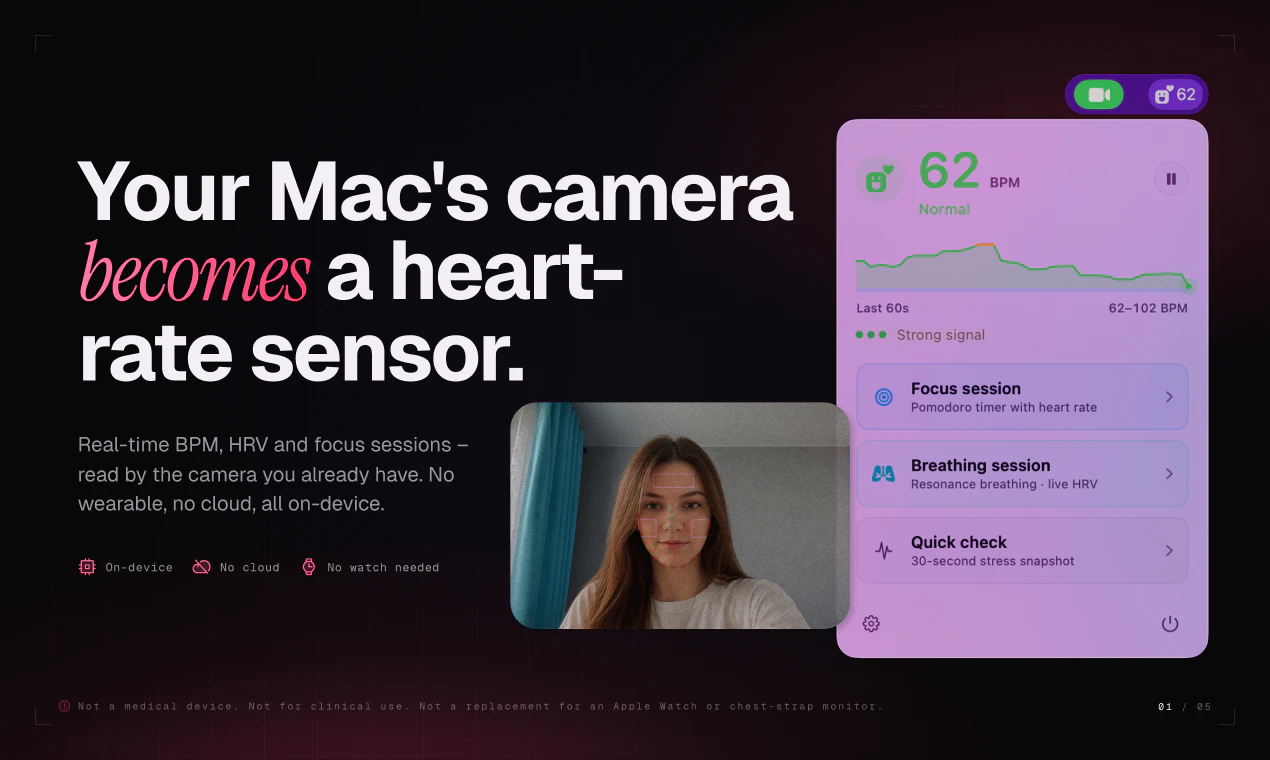
GlowPulse measures your heart rate from your Mac's built-in camera using rPPG – no watch, no chest strap, no wearable. Lives in the menu bar with live BPM, sparkline, and color-coded zones. 100% on-device. Camera frames are processed in memory and discarded. No cloud, no account, no telemetry. Pomodoro focus with live HR chart. Breathing sessions with real-time HRV. 30-second stress check. $2.99 once. macOS 13+.
AI Analysis
GlowPulse is a macOS menu bar app that uses the built-in camera and rPPG technology to measure heart rate without any wearables. Core features include live BPM display with sparkline and color-coded zones, Pomodoro focus mode with HR charts, guided breathing with real-time HRV, and 30-second stress checks. All processing is 100% on-device with zero cloud, accounts, or telemetry for maximum privacy. It solves key pain points like needing extra hardware for HR tracking during work, workflow interruptions, and data privacy concerns. The value proposition is an affordable one-time $2.99 tool that seamlessly integrates health monitoring and wellness (focus, stress, breathing) into daily Mac productivity.
In 2025-2026, market timing is favorable due to maturing on-device ML for health sensing, rising demand for privacy-focused non-wearable wellness tools amid device fatigue, and integration of biometrics into productivity apps. Post-pandemic emphasis on stress management and mental health continues, while economic pressures favor affordable one-time purchases over subscriptions. Apple's focus on on-device intelligence aligns perfectly with GlowPulse's approach. This represents Excellent Timing as user needs for seamless, hardware-free monitoring during desk work peak.
Technical implementation of rPPG on Mac cameras is achievable with established algorithms, though accuracy tuning requires effort. As a lightweight menu bar app, development and operation costs are low with no supply chain, hardware, or major compliance risks (privacy is a built-in advantage). Scalability is high as a digital product with potential for feature expansion or platform ports. Overall High feasibility for an indie developer, with minimal barriers beyond initial computer vision refinement.
Main target segments: Tech-savvy Mac users (macOS 13+), professionals and knowledge workers aged 25-45 in creative, development, office, and productivity-focused industries, primarily in North America, Europe, and other high-Mac-adoption regions. Estimated market: TAM for digital health & wellness apps exceeds $100B, SAM for desktop/Mac productivity tools ~$2-5B, SOM for this privacy-focused HR niche ~$50-100M. Core pain points include inability to easily track HR/stress/HRV at desk without wearables or interruptions. High willingness to pay for convenient, private solutions, evidenced by the low $2.99 one-time price point.
Competition level: Low. Direct competitors: 1. Instant Heart Rate (azumio.com) - mobile camera-based HR; 2. Welltory (welltory.com) - HRV analytics with wearables/camera; 3. Elite HRV (elitehrv.com) - focuses on wearable data; 4. Heart Rate Monitor apps by other developers (e.g., on App Store). Advantages: Superior Mac menu bar integration, Pomodoro/breathing workflows, strict on-device privacy, and one-time pricing vs subscriptions. Disadvantages: Likely lower accuracy than dedicated wearables, Mac-only, and requires stationary camera use. Strong differentiation through seamless productivity-health fusion and zero telemetry.
Upgrade Pro to unlock full AI analysis
Similar Products

Adapt
The company brain that gets work done
▲ 124 votes

Cercle
The bat signal for your closest friends.
▲ 121 votes

Kosshi
Simple, fast outliner for Mac and iPhone.
▲ 90 votes

WikiFix for Confluence
Find and fix issues in your knowledge base
▲ 86 votes

Refoid
Automate App Store refund responses and track every outcome
▲ 68 votes
Patchcord
Studio sound for your mic in every Mac meeting with EQ
▲ 64 votes