
MacSentinel
Find what’s slowing your Mac then clean it safely
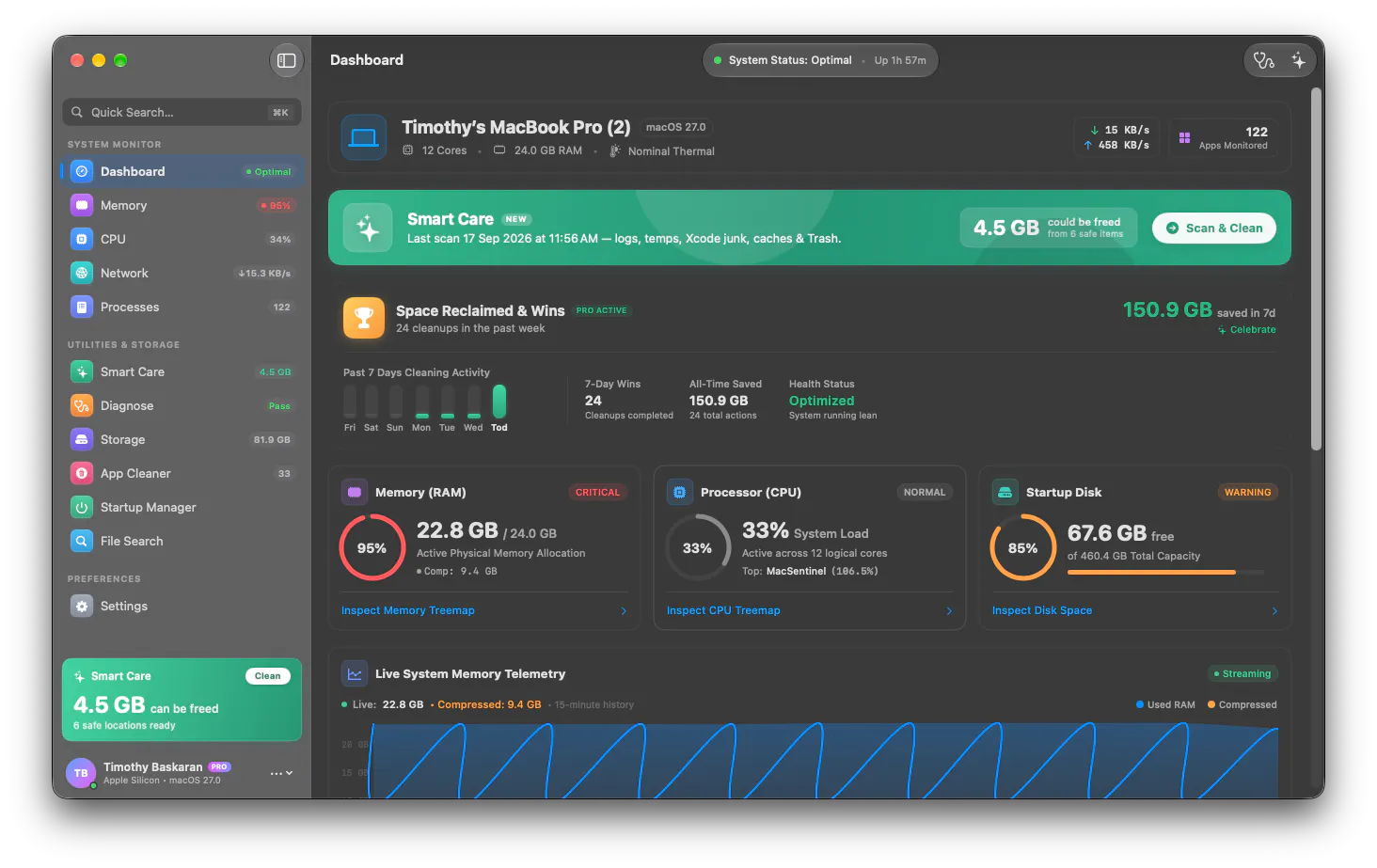
MacSentinel brings Mac monitoring, diagnosis, storage analysis, and cleanup into one native workflow. Instead of simply showing system metrics or deleting generic caches, it explains likely causes of slowdowns locally, then helps you act safely. Smart Care includes 500+ app rules across 50 categories, covering developer, creative, productivity, and AI tools. Cleanup is Trash-first and recoverable, and Pro is a one-time purchase — no subscription.
AI Analysis
MacSentinel is a native Mac app combining monitoring, diagnosis, storage analysis, and safe cleanup in one workflow. It explains likely causes of system slowdowns with local intelligence rather than generic metrics, then guides safe actions. Core features include Smart Care with 500+ app-specific rules across 50 categories (covering developer, creative, productivity, and AI tools), Trash-first recoverable cleanup, and detailed storage insights. It solves key pain points like unexplained Mac sluggishness, risky cache deletions, and app bloat. USP is its explanatory approach, safety-first design, and one-time Pro purchase with no subscriptions. Overall value: empowers users to maintain peak Mac performance intelligently and risk-free.
Favorable in 2025-2026 due to maturing Apple Silicon ecosystem, explosive growth in local AI tools and creative apps that consume significant storage/CPU, and rising user demand for transparent diagnostics over black-box cleaners. macOS updates continue to add complexity, while economic pressures make one-time purchases preferable to subscriptions. No major regulatory hurdles for utility apps. Overall: Excellent Timing.
High. Technical difficulty is manageable with standard macOS APIs for monitoring/storage (requires user permissions but many similar apps exist). Development costs for a native Swift app are moderate; ongoing operation is low as it's mostly desktop software with rule updates. Minimal supply chain or compliance risks beyond Apple notarization. Strong scalability for adding rules/categories. Team fit is good for Mac-focused developers. Key risks are building trust in cleanup safety.
Primary segments: Tech-savvy Mac power users, software developers, creative professionals (designers, video editors), productivity workers, and AI enthusiasts aged 25-50 with higher income. Geographic focus: US, Europe, Canada, Australia (high Mac adoption). Estimated TAM: Mac utility software market ~$500M+ globally; SAM (performance cleaners): ~$100M; SOM (first-year for this app): $1-5M. Core pain points: unexplained slowdowns, storage clutter from caches/logs, fear of breaking apps by deleting files. Willingness to pay: High for one-time purchase (~$29-49) as it avoids recurring fees common in competitors.
Medium. Direct competitors: 1. CleanMyMac X (macpaw.com/cleanmymac) - comprehensive but subscription-leaning; 2. DaisyDisk (daisydiskapp.com) - storage-focused analyzer; 3. Onyx (titanium-software.info/en/onyx) - free maintenance tool; 4. AppCleaner (freemacsoft.net/appcleaner); 5. iStat Menus (bjango.com/mac/istatmenus) for monitoring. Advantages: superior explanatory diagnostics, 500+ specific app rules for modern/AI tools, fully recoverable Trash-first approach, one-time purchase. Disadvantages: newer entrant with less brand recognition, potentially narrower feature set than CleanMyMac's all-in-one suite. Strong differentiation in 'why' explanations and safety.
Upgrade Pro to unlock full AI analysis
Similar Products

Opaline
PostHog for team Claude Code and Codex sessions.
▲ 141 votes

React UI Kit V7
All the chat components you need. None of the complexity
▲ 115 votes

Replay QA Security Scan
Automated Penetration Testing for AI-Built Apps
▲ 102 votes

Kosshi
Simple, fast outliner for Mac and iPhone.
▲ 90 votes

Audryo
Customer email your agent can operate.
▲ 68 votes

Refoid
Automate App Store refund responses and track every outcome
▲ 68 votes