
PortAura
See what’s listening on your Mac
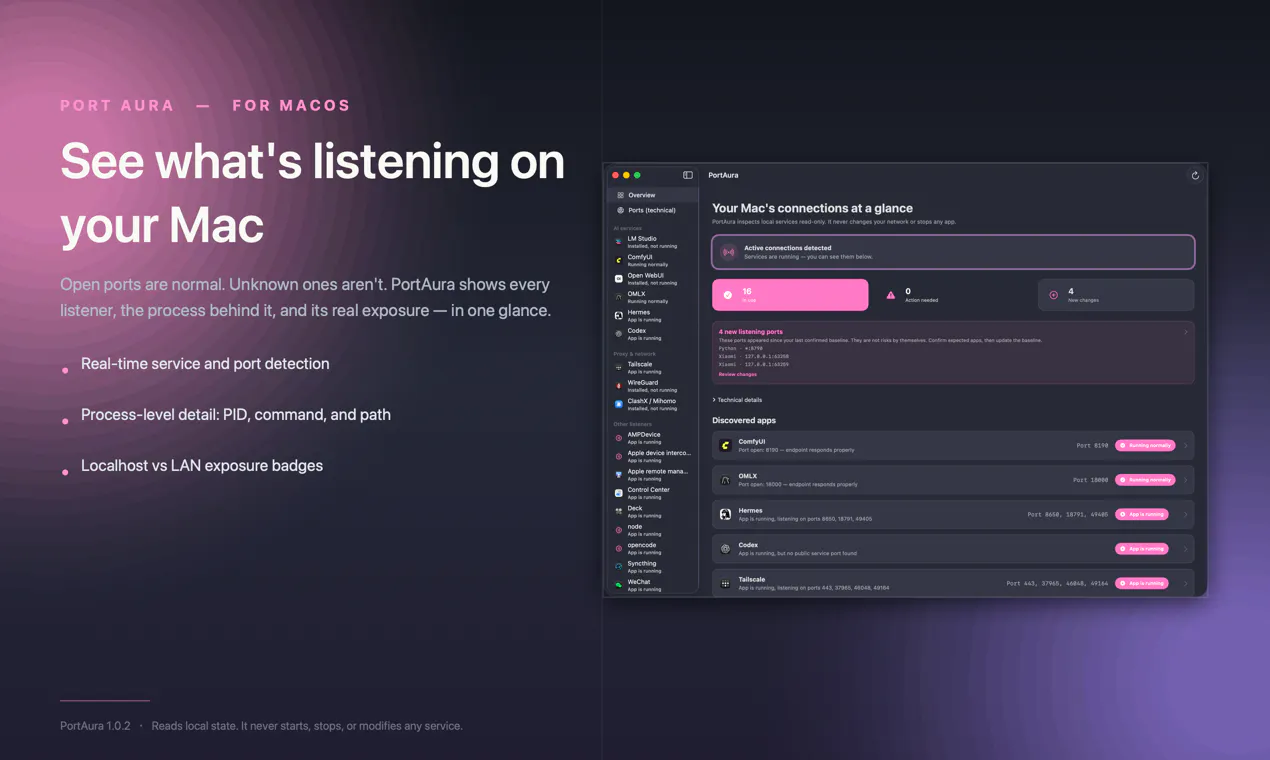
PortAura is a native macOS utility that shows which processes are listening on which ports, where they’re exposed, and what has changed since your trusted baseline. It helps you understand local services without digging through Terminal commands. Everything runs locally on your Mac.
AI Analysis
PortAura is a native macOS utility that visualizes which processes are listening on network ports, indicates exposure (local or public), and highlights changes from a trusted user-defined baseline. Core features include an intuitive GUI replacing complex Terminal commands (e.g. lsof), real-time insights, and fully local operation with no data leaving the device. It solves key pain points for users struggling with opaque network services, potential security risks from unknown listeners, and the steep learning curve of CLI tools. The value proposition is enhanced transparency, simplified security monitoring, and peace of mind for Mac users focused on local services without sacrificing privacy.
The current timing is favorable for 2025-2026 as cybersecurity threats continue to rise with AI-assisted attacks, expanding remote work, and stricter privacy regulations. MacOS market share is growing among developers and professionals who demand intuitive security tools over CLI. Technology for local monitoring is mature, and user demand for privacy-first, native apps is increasing amid data breach concerns. This positions PortAura well in the trend toward proactive device security. Rating: Excellent Timing.
Overall feasibility is high. Technical difficulty is moderate using established macOS frameworks and APIs for process and network inspection; no complex AI/ML or hardware dependencies. Development and operation costs are low for a native utility app, suitable for indie developers. Minimal supply chain or compliance risks since everything runs locally with no cloud component. Scalability is strong via direct downloads or App Store. Team fit is good for Mac-focused developers. Main risk is OS update compatibility. Rating: High.
Main target segments: macOS developers, security researchers, IT administrators, and privacy-conscious power users (ages 25-45, tech professionals). Industries: software development, cybersecurity, and tech enterprises. Geographic distribution: primarily North America and Europe. Estimated market size: TAM for macOS utilities and security tools approximately $800M+, SAM for developer/security niche $150M, SOM for port monitoring tools $15-20M. Core pain points: lack of visibility into listening processes and unexpected network exposure without using cumbersome CLI. Potential willingness to pay: high for simple, effective security utilities (likely one-time purchase $10-30).
Competition level: Medium. Direct competitors: 1. Little Snitch (https://www.obdev.at/products/littlesnitch/) - comprehensive outbound connection monitoring and firewall. 2. Lulu (https://objective-see.org/products/lulu.html) - free open-source firewall focused on network access control. 3. KnockKnock (https://objective-see.org/products/knockknock.html) - detects persistent software. 4. Wireshark (https://www.wireshark.org/) - deep packet inspection and analysis. 5. macOS built-in Activity Monitor and Terminal tools. Advantages: simpler focused UI on ports/baselines, change detection from trusted state, fully local and lightweight. Disadvantages: narrower scope than full-featured firewalls, newer product with less brand recognition, lacks advanced blocking features.
Upgrade Pro to unlock full AI analysis
Similar Products

Opaline
PostHog for team Claude Code and Codex sessions.
▲ 141 votes

React UI Kit V7
All the chat components you need. None of the complexity
▲ 115 votes

Replay QA Security Scan
Automated Penetration Testing for AI-Built Apps
▲ 102 votes

Kosshi
Simple, fast outliner for Mac and iPhone.
▲ 90 votes

Audryo
Customer email your agent can operate.
▲ 68 votes

Refoid
Automate App Store refund responses and track every outcome
▲ 68 votes