Quick Sub 2
Quick, creative video subtitling with direct canvas control
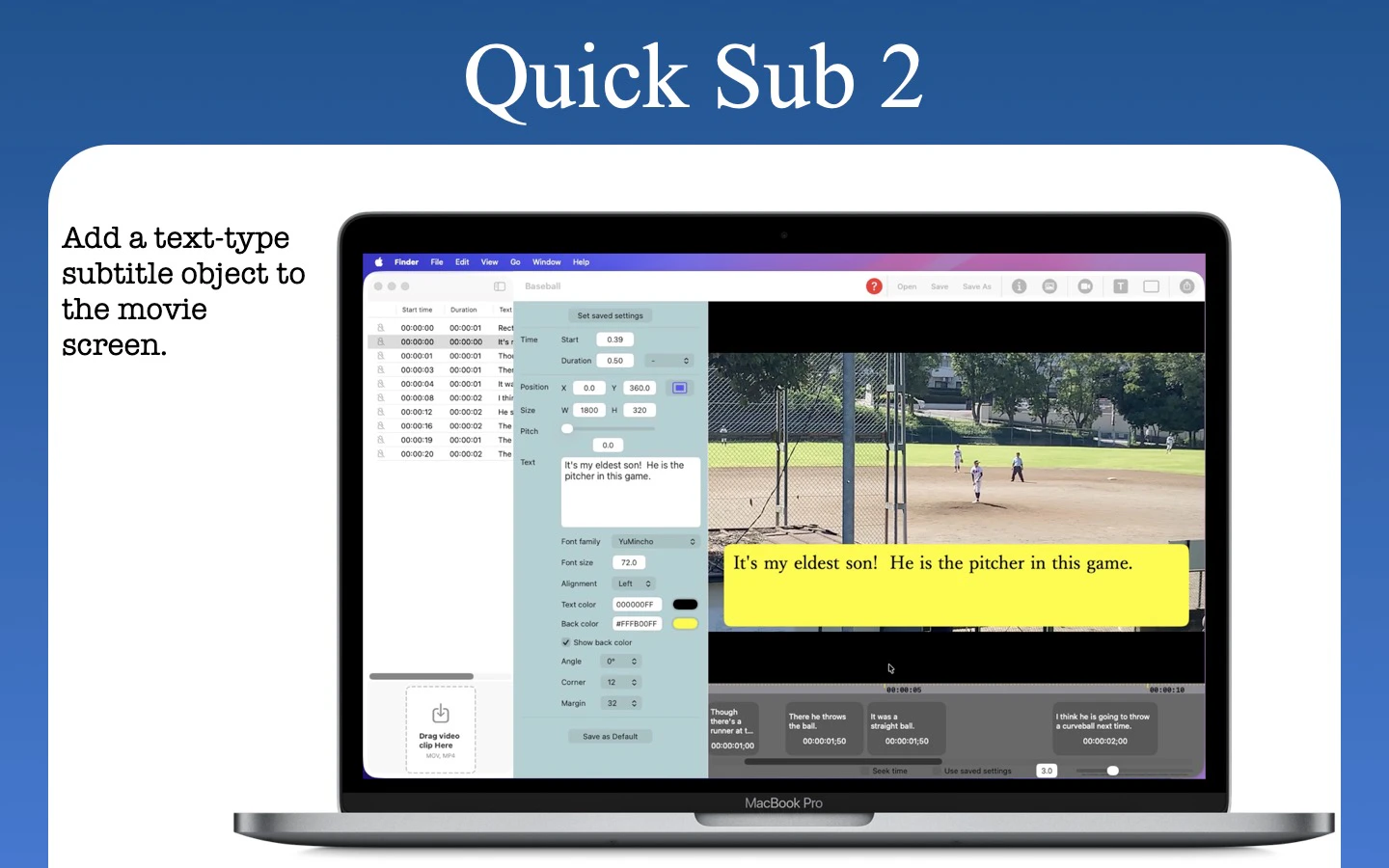
Quick Sub 2 is a streamlined macOS application built from the ground up in SwiftUI for creative video subtitling. Get independent control over text styling, container geometry, and rotation angles. Drag subtitle objects directly on the video canvas for perfect positioning, apply batch styles across multiple objects with a single command, and use a dynamic timeline that scales from 0.1x to 10x for precision timing. The application has full native Undo/Redo stacks andqsub2 file persistence.
AI Analysis
Quick Sub 2 is a streamlined macOS app built in SwiftUI for creative video subtitling. Core features include direct dragging of subtitle objects on the video canvas for precise positioning, independent controls for text styling, container geometry and rotation angles, batch style application, a dynamic timeline scaling from 0.1x to 10x, native undo/redo, and .qsub2 file persistence. USPs are its intuitive canvas-first interaction and fine-grained creative control not found in traditional timeline-only tools. It solves key pain points like inefficient subtitle placement, limited design flexibility, and imprecise timing for video creators. The value proposition is enabling faster, more artistic subtitling workflows for professional-looking results.
The market timing is favorable for 2025-2026. Short-form video consumption continues to surge across social platforms, increasing demand for high-quality, creatively designed subtitles to boost engagement and meet accessibility standards. Video production tools are mature, Mac-native apps are preferred by creative professionals, and while AI auto-captioning grows, there remains strong demand for manual, precise creative control. Economic trends support content creator economy. This constitutes Excellent Timing.
Feasibility is High. Technical difficulty is low-to-medium as it leverages mature SwiftUI for macOS with no complex AI or backend infrastructure required. Development and operation costs are manageable for a solo or small team digital product. No significant supply chain or compliance risks beyond standard App Store distribution. It demonstrates strong scalability as a one-time purchase or subscription software with potential for feature expansion. The app is already built from the ground up, minimizing execution risk.
Primary users are Mac-based video editors, independent content creators, YouTubers, social media marketers and designers (ages 25-45) focused on high-production short and long-form videos. Geographically concentrated in North America, Europe and other English-speaking regions with high Mac adoption. The broader video editing software market is large; this addresses a niche but dedicated segment of creators needing creative subtitling. Core pain points include tedious manual timing/positioning and lack of precise design tools. Users show strong willingness to pay for specialized, time-saving native Mac tools.
Competition level is Medium. Direct competitors: 1. Aegisub (aegisub.org), 2. Subtitle Edit (nikse.dk/subtitleedit), 3. Built-in caption tools in Final Cut Pro (apple.com/final-cut-pro), 4. DaVinci Resolve (blackmagicdesign.com), 5. Kapwing (kapwing.com). Advantages: Superior direct on-canvas drag control, independent geometry/rotation, batch styling and highly responsive native Mac interface. Disadvantages: Newer entrant with potentially smaller feature set and less established brand compared to mature industry tools. Strong differentiation in creative canvas workflow.
Upgrade Pro to unlock full AI analysis
Similar Products

Loot
Collect your favorite things in real life
▲ 115 votes

Kosshi
Simple, fast outliner for Mac and iPhone.
▲ 90 votes

LayerProof Kraft
Co-write insightful long form content
▲ 84 votes

Polygram
AI-native design and coding app to build mobile & web apps
▲ 81 votes

Bevell
CAD automation where it counts.
▲ 78 votes

Mantel
Stop confusing your Claude Code sessions & terminal windows
▲ 72 votes