
QuickRight
The missing right-click features for macOS Finder
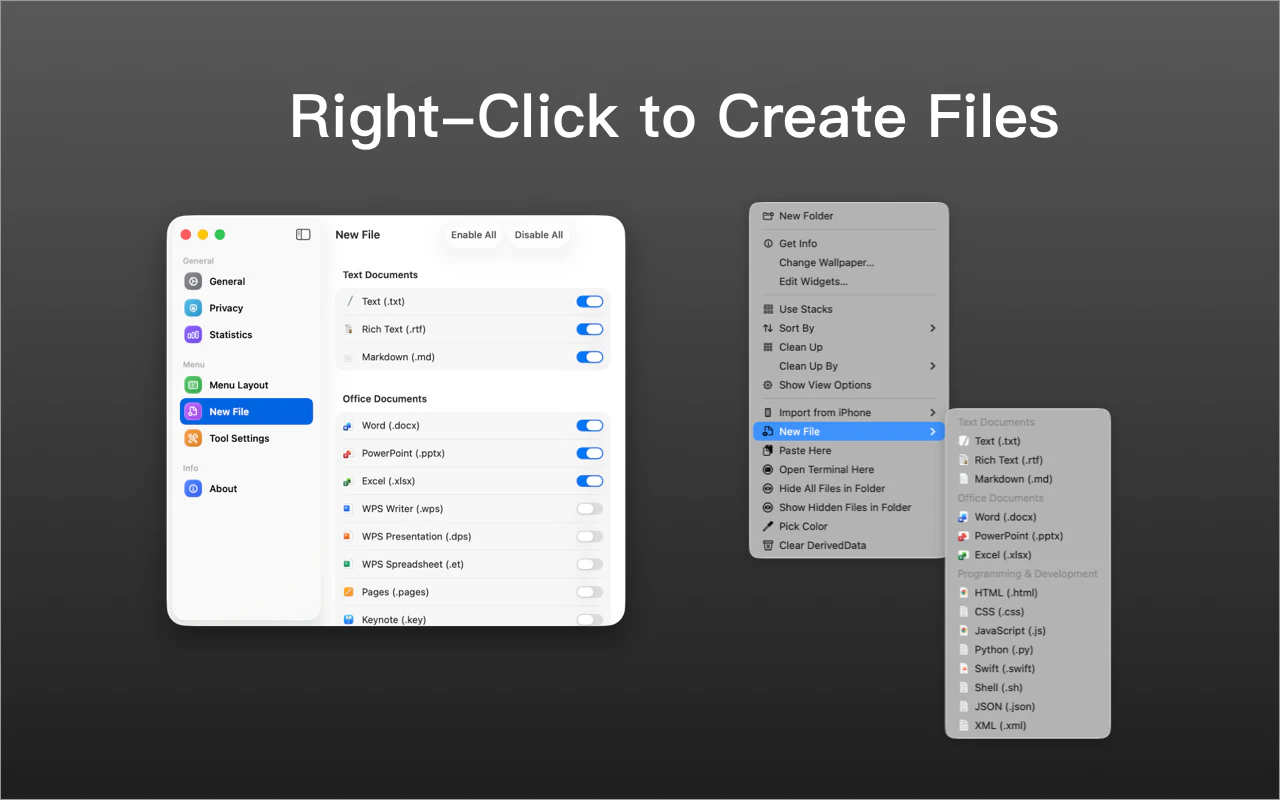
QuickRight adds the missing right-click features to macOS Finder. Create new files instantly, use true Cut & Paste, open Terminal or Warp in the current folder, copy file paths, move files faster, compress images, extract colors, check hashes, and more — all directly from Finder’s context menu. Built for macOS users who work with files every day.
AI Analysis
QuickRight enhances macOS Finder's context menu with missing features like instant new file creation, true Cut & Paste, opening Terminal or Warp in current folder, copying file paths, faster file moves, image compression, color extraction, hash checks, and more. It solves key pain points of limited native options and inefficient daily file workflows for Mac power users. Unique selling points include seamless Finder integration without app switching and a broad utility bundle. Overall value proposition is boosted productivity through time-saving right-click actions directly in the familiar interface.
In 2025-2026, macOS user base continues expanding in tech/creative sectors with sustained demand for productivity enhancements amid hybrid work. Menu bar and extension tech is mature, user needs for workflow optimization remain strong, and economic conditions favor affordable indie tools. Though not tied to emerging tech like AI, the evergreen need for Finder improvements makes it suitable. Rating: Excellent Timing.
High. Technical difficulty is moderate using established macOS APIs for context menus and menu bar apps. Low development and operation costs for a focused utility, minimal supply chain or compliance risks, strong fit for indie macOS developers, and high scalability via iterative updates and feature expansions.
Main segments: Tech-savvy macOS power users (developers, designers, content creators) aged 25-45 who manage files daily; concentrated in US, Europe, and tech hubs in Asia. Core pain points: cumbersome Finder operations and missing quick actions. Estimated market size: Substantial TAM in global Mac productivity software with SAM for Finder utilities in the millions of users; strong willingness to pay for time-saving tools (likely $10-50 one-time or subscription).
Medium. Direct competitors: 1. TotalFinder (totalfinder.binaryage.com), 2. Path Finder (cocoatech.com), 3. Default Folder X (stclairsoft.com/DefaultFolderX), 4. XtraFinder (trankes.com). Advantages: Lightweight context-menu focus with unique bundled utilities (e.g. color extraction, hashes) not central to competitors, simpler than full file manager replacements. Disadvantages: Potential overlap with some built-in or free tools, requires ongoing macOS compatibility maintenance, less feature depth than comprehensive alternatives.
Upgrade Pro to unlock full AI analysis
Similar Products

Adapt
The company brain that gets work done
▲ 124 votes

Kosshi
Simple, fast outliner for Mac and iPhone.
▲ 90 votes

Thoughts for Mac
Capture notes from your menubar using text, images or voice
▲ 90 votes

WikiFix for Confluence
Find and fix issues in your knowledge base
▲ 86 votes

Refoid
Automate App Store refund responses and track every outcome
▲ 68 votes

Patchcord
Studio sound for your mic in every Mac meeting with EQ
▲ 64 votes