
superfile
A modern, visual file manager for the terminal
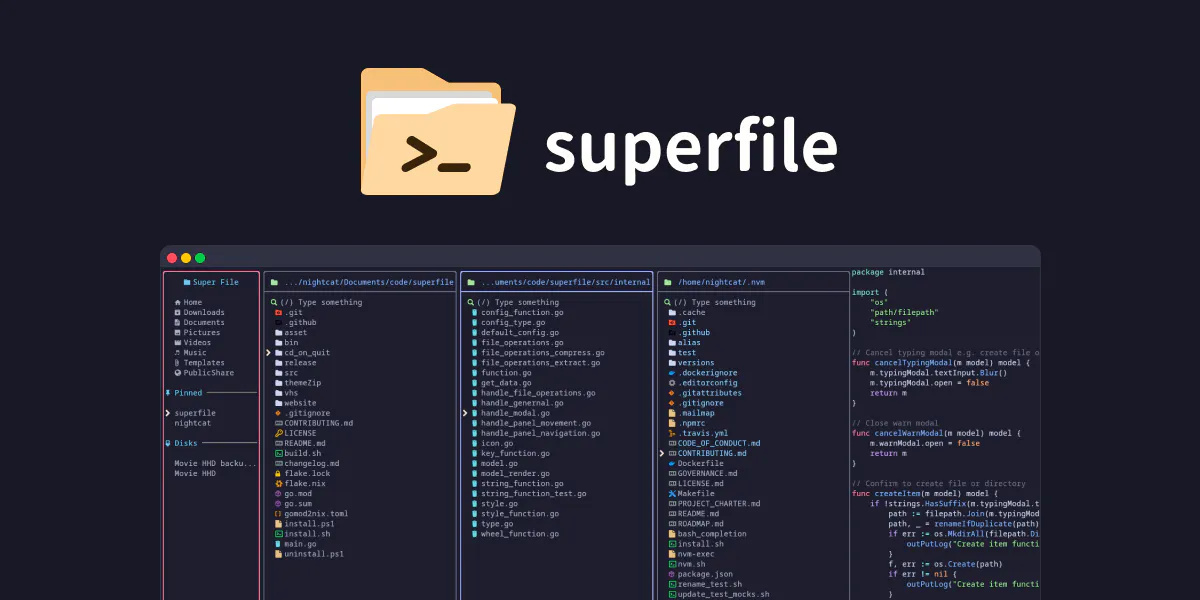
Superfile is a modern terminal file manager with a polished multi-panel interface, strong previews, and deep customization. It lets you browse, preview, and move files across panes the way a desktop file manager would, while staying fully keyboard-driven and fast.
AI Analysis
Superfile is a modern visual file manager for the terminal with a polished multi-panel interface, strong file previews, and deep customization. It enables keyboard-driven browsing, previewing, and moving files across panes similar to desktop managers. It addresses key user pain points like lack of visual feedback, cumbersome navigation, and limited previews in traditional CLI tools such as basic ls/cd commands. Unique selling points include its fast, intuitive TUI design that blends GUI-like usability with terminal speed and efficiency. The overall value proposition is enhanced productivity for developers and power users who live in the terminal, offered as a free open-source tool to encourage community-driven improvements.
In 2025-2026, trends favor productivity tools for developers with rising remote/hybrid work, AI-assisted coding, and demand for efficient CLI enhancements. TUI frameworks are mature, supporting rich interfaces, while user preferences shift toward visual yet lightweight tools. Open-source policies and economic focus on dev tools create a supportive environment. However, the terminal file manager space has seen recent entrants, making it competitive but not oversaturated. Moderate Timing.
Technically straightforward using established TUI libraries (e.g., in Go), with low development and operation costs as demonstrated by its existing open-source implementation. Minimal supply chain or compliance risks for a desktop CLI app. Strong scalability via package managers and GitHub distribution. Fits well for small teams or indie developers with high community support potential. Overall High feasibility due to proven tech, low barriers, and easy maintenance.
Primary segments: Software developers, DevOps engineers, system administrators (ages 25-45, tech professionals). Industries: Software development, IT operations. Geographic: Global with high adoption in North America, Europe, and Asia (esp. China, US). Estimated market: TAM for developer productivity tools ~$15B, SAM for terminal utilities ~$800M, SOM for visual file managers ~$50M. Core pain points: Inefficient file handling without previews or multi-view in terminals. Potential willingness to pay: Moderate; open-source model relies on donations/sponsorships, with possible future premium themes or enterprise support.
Competition level: Medium. Direct competitors: 1. Yazi (https://github.com/sxyazi/yazi), 2. Ranger (https://ranger.github.io/), 3. lf (https://github.com/gokcehan/lf), 4. nnn (https://github.com/jarun/nnn). Advantages vs competitors: More polished and modern multi-panel visual design, superior preview capabilities, and extensive customization options. Disadvantages: Newer project with potentially smaller established user base and community compared to mature tools like Ranger; may lack some advanced scripting features found in nnn or lf. Differentiation through desktop-like UX in terminal stands out but faces pressure from fast, lightweight alternatives like Yazi.
Upgrade Pro to unlock full AI analysis
Similar Products

Adapt
The company brain that gets work done
▲ 124 votes

Tapfree for Chrome
Voice dictation that adapts to what’s on your screen
▲ 122 votes

Kosshi
Simple, fast outliner for Mac and iPhone.
▲ 90 votes

Thoughts for Mac
Capture notes from your menubar using text, images or voice
▲ 90 votes

WikiFix for Confluence
Find and fix issues in your knowledge base
▲ 86 votes

Refoid
Automate App Store refund responses and track every outcome
▲ 68 votes