
Tabnxt
AI tab manager that suspends background RAM hogs
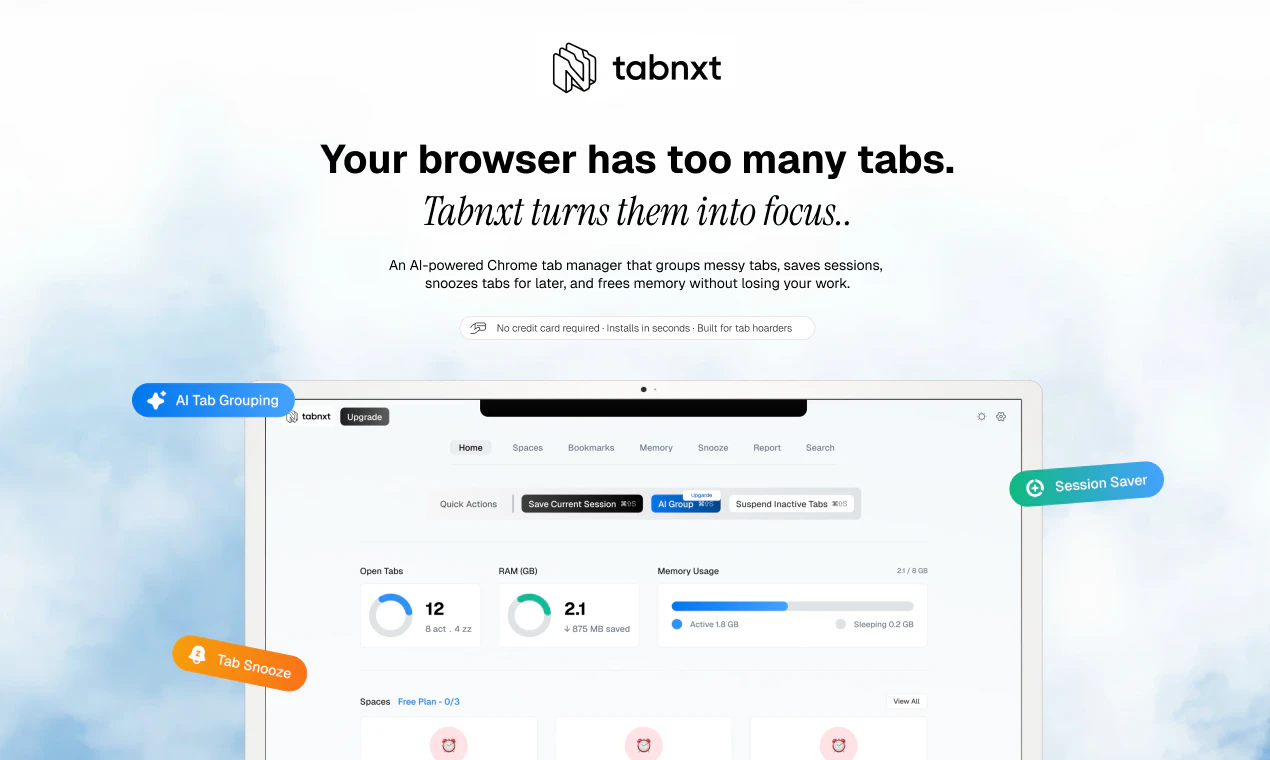
Chrome running slow? Tabnxt keeps your browser fast. It auto-suspends inactive background tabs to save 80% RAM, groups 40+ tabs into AI workspaces in 3s, and lets you snooze pages for later. Beautiful popup-first dashboard built for tab hoarders.
AI Analysis
Tabnxt is an AI-powered Chrome tab manager designed for tab hoarders. Core features include automatic suspension of inactive background tabs to reduce RAM usage by up to 80%, AI that intelligently groups 40+ tabs into organized workspaces in just 3 seconds, a snooze option to park pages for later, and a beautiful popup-first dashboard. It solves key pain points like browser slowdown from memory hogs, tab clutter, lost productivity, and difficulty rediscovering saved pages. The value proposition is a fast, intelligent, and visually appealing way to reclaim browser performance and organization without losing access to important tabs.
In 2025-2026, AI integration in productivity tools is maturing rapidly, with growing demand for automation amid rising remote/hybrid work and complex web apps that inflate browser RAM usage. Users are seeking smarter, AI-native solutions rather than manual tab tools. Economic focus on efficiency and mature browser extension ecosystems make adoption easier. This is Excellent Timing.
Technical difficulty is moderate: leverages mature Chrome WebExtensions APIs for tab control and cloud AI (e.g. LLMs) for grouping. Dev/operation costs are manageable (primarily AI API usage and hosting). Low supply chain risk; main concerns are data privacy compliance (tabs may contain sensitive info) and scalability of AI features. Strong scalability potential as a lightweight extension. Overall rating: High.
Primary segments: Tech-savvy tab hoarders including software developers, researchers, content creators, digital marketers, and power users aged 25-45 who routinely open 30+ tabs. Geographically focused on North America, Europe, and East Asia (high Chrome usage). TAM for browser productivity tools approx. $5B+, SAM for tab/session managers ~$300M, SOM for AI-enhanced versions ~$15-20M initially. Core pains: RAM-induced slowdowns, tab overload, and poor rediscovery. Moderate-to-high willingness to pay for premium AI features via subscription.
Medium. Direct competitors: 1. OneTab (onetab.com) - condenses tabs into a list. 2. Workona (workona.com) - professional tab workspaces. 3. Session Buddy (sessionbuddy.com) - session save/restore. 4. Toby (tobyapp.com) - visual bookmark/tab organizer. 5. Tab Wrangler (Chrome extension). Advantages: Faster AI auto-grouping (3s), strong RAM savings focus, snooze functionality, and modern popup UI built for hoarders. Disadvantages: Newer product with less established trust, potential ongoing AI costs vs. mostly free competitors, and possibly narrower feature breadth initially.
Upgrade Pro to unlock full AI analysis
Similar Products

Cohere Parse 5
Turn complex docs, tables & images into AI-ready data
▲ 158 votes

Adapt
The company brain that gets work done
▲ 124 votes

Tapfree for Chrome
Voice dictation that adapts to what’s on your screen
▲ 122 votes

Replay QA Security Scan
Automated Penetration Testing for AI-Built Apps
▲ 102 votes

Kosshi
Simple, fast outliner for Mac and iPhone.
▲ 90 votes

Thoughts for Mac
Capture notes from your menubar using text, images or voice
▲ 90 votes