
Timebase
A calmer way to visualize & plan across timezones
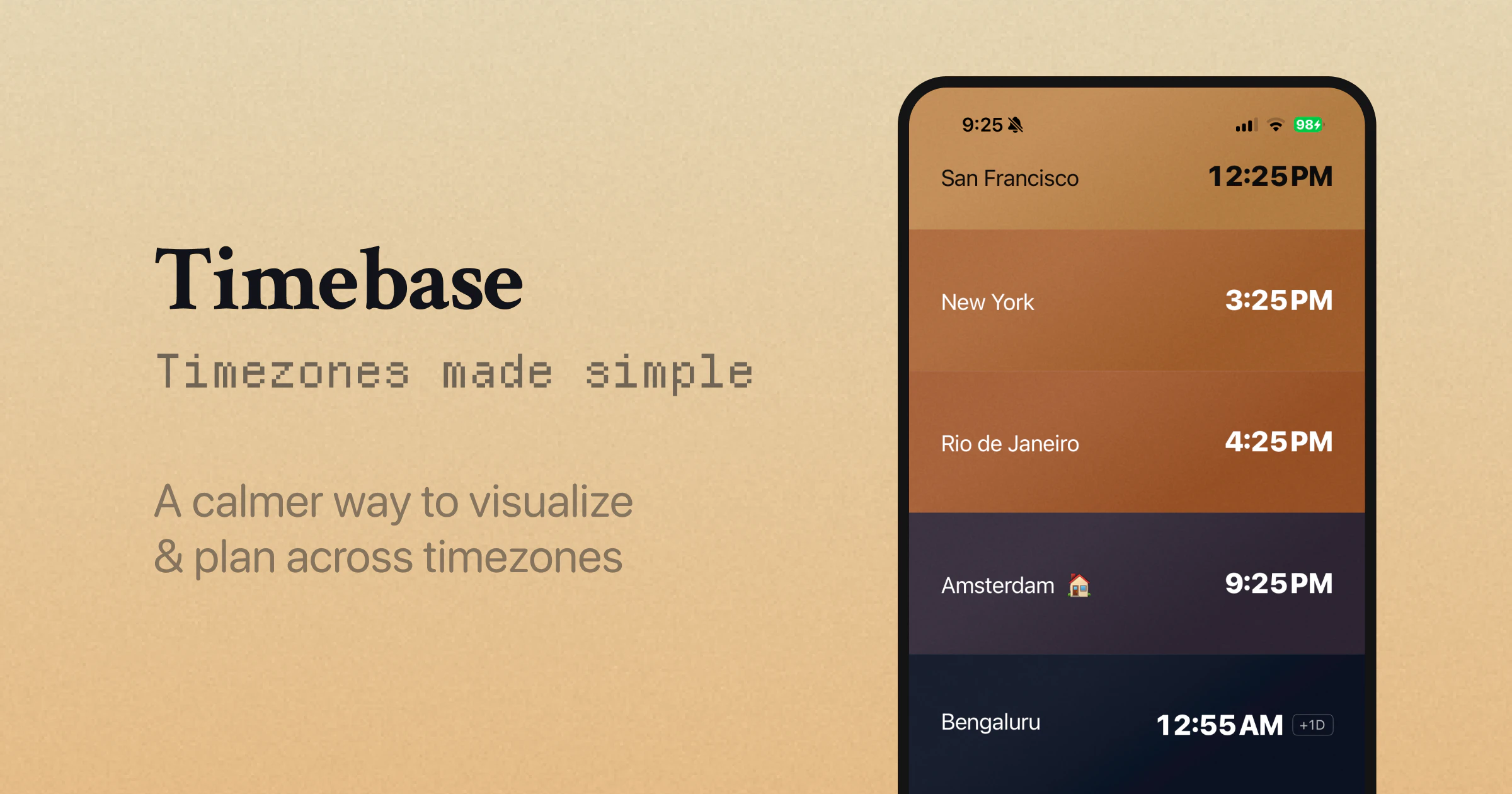
Timebase lets you visualize time across the world. Scrub the day forward or back, and the time moves across every city at once, each one lit by the color of its own sky. Comes with a meeting planner to find the right time for everyone, and live countdowns to your upcoming events. Coming soon to iPad, Mac, and Apple Watch. Free, offline, iCloud-synced. No signup, no analytics, no servers.
AI Analysis
Timebase is a free iOS app that provides a calm, visual way to understand global timezones. Users can scrub through the day on an interactive world map where each city is lit by realistic sky colors reflecting local time of day. Core features include a built-in meeting planner to identify mutually suitable times and live countdowns to upcoming events. It addresses key pain points like confusion in timezone conversion, scheduling meetings across regions without causing fatigue, and lack of intuitive global time awareness. Unique selling points are its beautiful, serene design, complete offline functionality, iCloud sync, zero signup or analytics, and privacy focus with no servers. It is expanding to iPad, Mac, and Apple Watch. The value proposition is an elegant, private productivity tool for global coordination without complexity or data collection.
In 2025-2026, remote and hybrid work remains standard with growing global teams across tech and digital industries, increasing demand for intuitive timezone tools. Technology for precise geolocation and time calculation is fully mature, while trends favor privacy-focused, beautiful 'calm tech' apps over data-heavy alternatives. Economic pressures encourage efficient remote collaboration tools, and Apple's ecosystem continues to expand. This aligns well with user needs for offline, no-signup solutions. Excellent Timing.
High feasibility overall. Technical difficulty is low as it relies on standard iOS time and location APIs with client-side calculations; no backend servers reduces complexity and costs significantly. Development and operation costs are minimal (offline-first, iCloud sync is straightforward). No major supply chain or compliance risks beyond standard App Store guidelines. Scalability is excellent as a client-side app with potential easy expansion to other Apple platforms. The solo or small-team friendly model fits well. Key risk is only UI polish for the unique visualization.
Primary users are tech professionals, remote workers, freelancers, and project managers in globally distributed teams (ages 25-45, tech-savvy Apple users). Industries: software, consulting, digital marketing, startups. Geographic focus: North America, Europe, and Asia with high remote work adoption. TAM for productivity tools exceeds $50B, SAM for timezone/scheduling apps around $200-500M, SOM for premium visualization apps ~$10-20M. Core pain points include meeting scheduling fatigue and poor timezone intuition. Willingness to pay is moderate; while currently free, users in professional settings may pay for advanced features or cross-platform access.
Medium. Direct competitors: 1. World Time Buddy (worldtimebuddy.com), 2. Time Zone Converter by timeanddate.com, 3. Clockwise (getclockwise.com), 4. Fantastical by Flexibits (flexibits.com), 5. Various iOS World Clock apps. Advantages: Unique serene sky-color visualization and scrubbing interface, strong privacy (fully offline, no analytics/servers), integrated meeting planner with countdowns, completely free. Disadvantages: Currently iOS-only (competitors often cross-platform/web), newer with smaller user base, lacks some advanced scheduling automation found in Clockwise or Fantastical. Strong differentiation through calm design and privacy focus gives it an edge in the Apple ecosystem.
Upgrade Pro to unlock full AI analysis
Similar Products

Adapt
The company brain that gets work done
▲ 124 votes

Coarena by Coasty
The arena where agents battle on real-world work
▲ 104 votes

Kosshi
Simple, fast outliner for Mac and iPhone.
▲ 90 votes

Thoughts for Mac
Capture notes from your menubar using text, images or voice
▲ 90 votes

WikiFix for Confluence
Find and fix issues in your knowledge base
▲ 86 votes

Refoid
Automate App Store refund responses and track every outcome
▲ 68 votes