
Turfs
Keep content across your Mac organized in defined areas
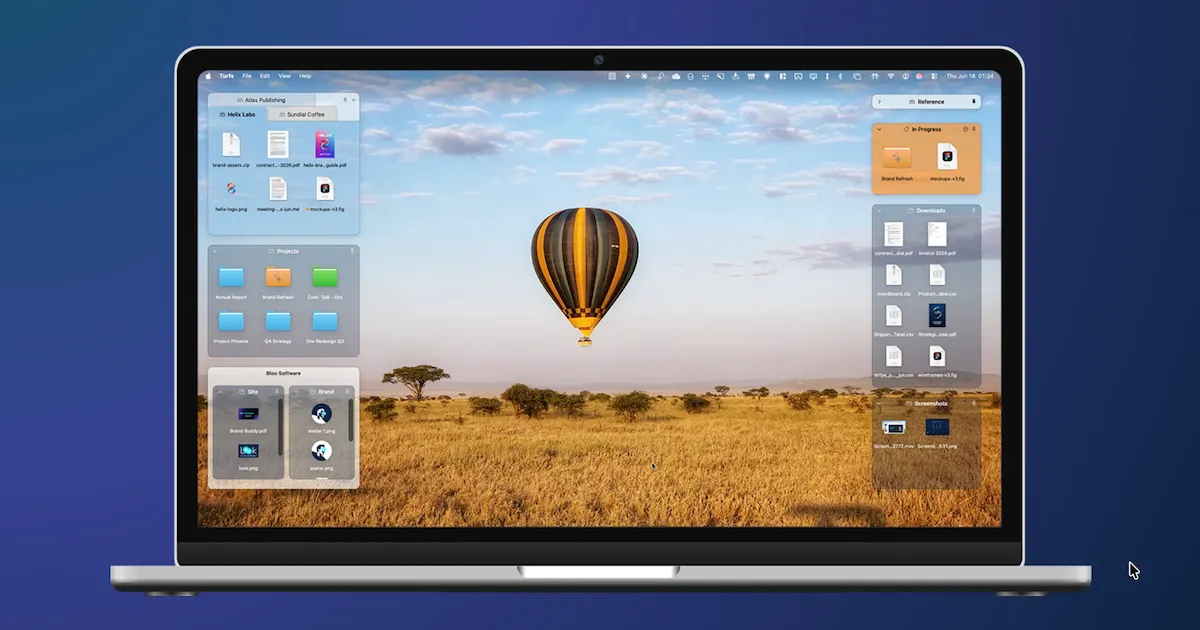
Use the desktop to keep content from across your Mac accessible and organized in defined areas — or simply keep it clutter-free. A turf can be backed by a real folder, a Finder tag, or your hand-picked selection of files and folders. Turfs stay put through Show Desktop; you choose what Mission Control does with them. Quit, and the desktop is exactly as it was. It replaces Finder's own desktop icon layer, so it can never be sandboxed or sold on the Mac App Store. $29 once, 10-day trial, no card.
AI Analysis
Turfs is a macOS menu bar app that organizes desktop content into defined 'turfs' backed by real folders, Finder tags, or custom file selections. Core features include persistence through Show Desktop, customizable Mission Control behavior, and exact desktop restoration on quit. It replaces Finder's icon layer for unrestricted access but cannot be sandboxed or sold on the Mac App Store. USP is its seamless, non-intrusive desktop management. It solves pain points of desktop clutter, scattered files, and workflow disruption on Mac. Value proposition: a one-time $29 purchase (10-day trial) for a clean, organized, and accessible digital workspace.
In 2025-2026, productivity tools for Apple ecosystem remain relevant amid remote/hybrid work trends and maturing macOS features. However, rising AI-driven file search, cloud storage integration, and automation tools may reduce need for manual desktop organization. Economic factors favor one-time purchase software. It is a decent but not peak time for niche Mac utilities. Rating: Moderate Timing.
Technical difficulty is medium due to low-level macOS desktop integration and non-sandboxed requirements. Development/operation costs are low for an indie desktop app with one-time pricing. Minimal supply chain or compliance risks beyond Apple distribution policies. Strong scalability as pure software with potential for updates. Overall rating: High, suitable for small team or solo Mac developer.
Main target segments: macOS power users, creative professionals (designers, developers), and productivity enthusiasts aged 25-45, concentrated in North America and Europe. Estimated market: Mac productivity software TAM ~$2B+, SAM for desktop tools ~$200M, SOM for this niche ~$5-10M. Core pain points: desktop clutter, inefficient file access, and workflow interruptions. Potential willingness to pay: high, as Mac users frequently purchase quality one-time fee utilities like this $29 app.
Competition level: Medium. Direct competitors: 1. TotalFinder (binaryage.com), 2. Path Finder (cocoatech.com), 3. Default macOS Finder with tags (apple.com), 4. HoudahSpot (houdah.com). Advantages: unique turf concept with Mission Control integration, persistence features, and non-sandboxed power; one-time pricing. Disadvantages: unavailable on Mac App Store limiting visibility, narrower scope than full file managers, requires user adaptation to new desktop paradigm.
Upgrade Pro to unlock full AI analysis
Similar Products

Adapt
The company brain that gets work done
▲ 124 votes

Kosshi
Simple, fast outliner for Mac and iPhone.
▲ 90 votes

Thoughts for Mac
Capture notes from your menubar using text, images or voice
▲ 90 votes

WikiFix for Confluence
Find and fix issues in your knowledge base
▲ 86 votes

Refoid
Automate App Store refund responses and track every outcome
▲ 68 votes

Patchcord
Studio sound for your mic in every Mac meeting with EQ
▲ 64 votes