
WattMate
Which app is draining your Mac, in watts and minutes saved
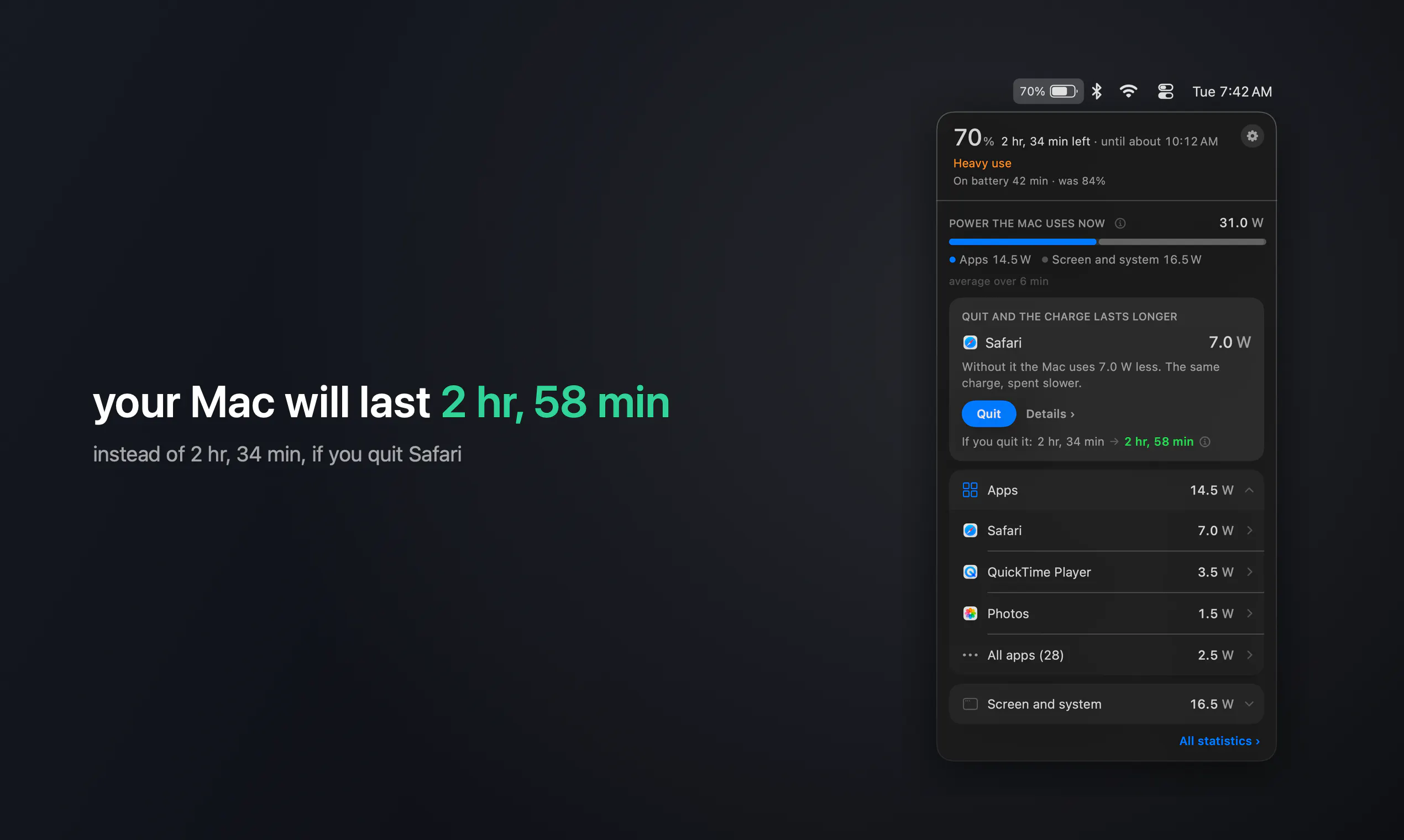
WattMate sits in the Mac menu bar and shows which app is draining the battery right now, in watts, and how many minutes you get back if you quit it. 2 minutes after you quit, it measures again and prints what really changed. Apple silicon, macOS 14+.
AI Analysis
WattMate is a macOS menu bar app for Apple Silicon (macOS 14+) that shows real-time battery drain per app in watts and estimates minutes of battery life regained by quitting it. It re-measures after 2 minutes to confirm actual impact. It solves the pain point of invisible app battery drain on MacBooks, enabling data-driven decisions to extend usage and boost productivity. USP: precise quantitative metrics (watts + verified time saved) in a simple interface. Overall value: helps users optimize battery without guesswork.
Favorable in 2025-2026 due to maturing Apple Silicon ecosystem, rising remote/hybrid work increasing laptop dependency, growing user focus on energy efficiency and sustainability, and demand for practical productivity tools amid economic pressures. Battery optimization remains a persistent pain despite hardware improvements. Excellent Timing.
High. Technical implementation uses existing macOS power APIs on Apple Silicon with moderate difficulty for accurate per-app measurement. Low dev/operation costs as a lightweight indie menu bar app, no supply chain or major compliance risks. Strong scalability via digital distribution. Main risk is API reliability across updates. Rating: High.
Primary users: tech-savvy MacBook professionals, developers, freelancers and power users (ages 25-45, higher income). Industries: tech, creative, consulting. Geographic: mainly US, Europe, with growing Asia adoption. TAM ~$100M+ (Mac utility apps), SAM ~$20M (battery/productivity tools), SOM ~$2-5M. Core pains: unexplained battery drain reducing mobility. Moderate-high willingness to pay for simple, effective tools (likely one-time purchase).
Low. Direct competitors: 1. iStat Menus (bjango.com/mac/istatmenus), 2. Stats (github.com/exelban/stats), 3. coconutBattery (coconut-flavour.com/coconutbattery), 4. MenuBar Stats apps like Sense or similar monitors. Advantages: hyper-focused on per-app watts + predictive/verified minutes saved with post-quit validation; simpler than full monitors. Disadvantages: narrower feature set vs comprehensive system tools; newer entrant with less brand recognition. Strong differentiation in actionable battery insights.
Upgrade Pro to unlock full AI analysis
Similar Products

Adapt
The company brain that gets work done
▲ 124 votes

Tapfree for Chrome
Voice dictation that adapts to what’s on your screen
▲ 122 votes

Buddy AI Note
Your daily memo that turns notes into a plan
▲ 94 votes

Kosshi
Simple, fast outliner for Mac and iPhone.
▲ 90 votes

Thoughts for Mac
Capture notes from your menubar using text, images or voice
▲ 90 votes

Refoid
Automate App Store refund responses and track every outcome
▲ 68 votes