
Shelly
Run OpenAI Codex CLI natively on Android
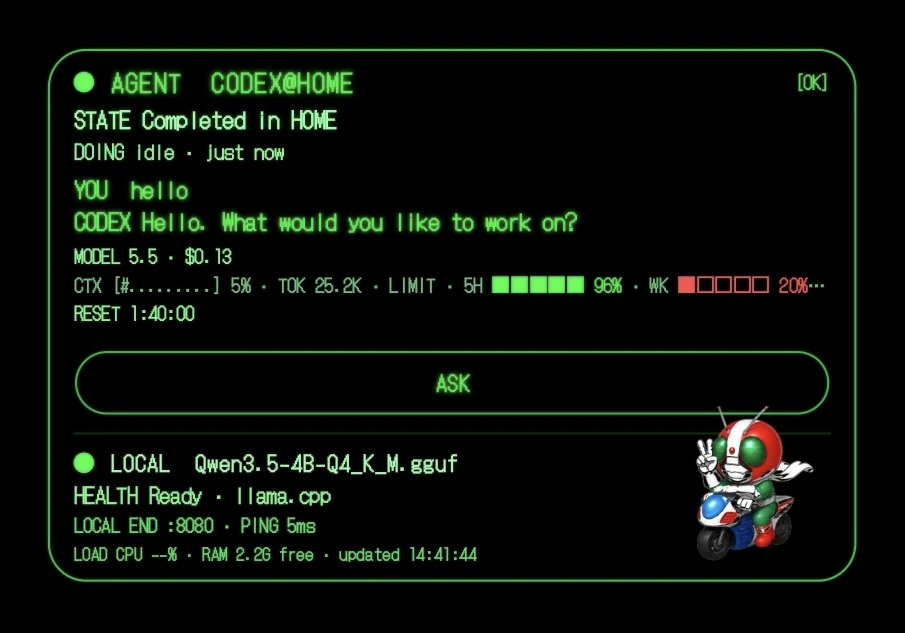
Shelly runs the OpenAI Codex CLI natively on Android — no PC, no Termux, no proot. It pairs a real native terminal with an Agent Chat pane that reads Codex output live and runs fixes with one tap. A home-screen Scouter widget shows quota, cost and rate limits, and lets you fire prompts straight from the home screen. Local LLMs (Qwen3.5 + llama.cpp) supported. Open source, GPLv3. Built entirely by directing AI agents — I don't write the code myself.
AI Analysis
Shelly enables running OpenAI Codex CLI natively on Android without PC, Termux, or proot. Core features include a native terminal paired with an Agent Chat pane that reads Codex output live and executes one-tap fixes, plus a home-screen Scouter widget for monitoring quota, cost, rate limits and launching prompts instantly. It supports local LLMs via Qwen3.5 and llama.cpp, is fully open source under GPLv3, and was built entirely by directing AI agents. It solves key pain points for mobile developers: complex setup barriers, lack of seamless AI coding on Android, and difficulty tracking API usage on the go. The value proposition is a portable, efficient, AI-powered coding companion that brings powerful dev tools directly to Android home screens.
In 2025-2026, AI agent adoption, local LLM efficiency gains, and mobile-first developer workflows are accelerating rapidly. Demand for on-device AI coding tools is rising with remote work trends and API cost awareness, while open-source AI projects thrive. Shelly's native Android focus, local model support, and AI-built nature align perfectly with these shifts. Excellent Timing.
Technical difficulty is moderate: leverages mature llama.cpp but requires sophisticated native Android terminal and real-time agent integration. Development costs are very low since the product was built entirely by directing AI agents rather than traditional coding. No supply chain issues as pure software; open-source GPLv3 model aids community-driven scalability and maintenance. Compliance risks minimal. High overall feasibility with strong scalability potential.
Primary segments: Android-using software developers, indie hackers, AI tinkerers and open-source enthusiasts, ages 20-40. Industries: software engineering and AI development. Geographic distribution: global with strong adoption in high-Android regions (Asia, US, Europe). Core pain points are cumbersome mobile coding setups and real-time AI assistance gaps. Market is niche yet high-engagement within the growing mobile AI dev tools space. Willingness to pay is moderate (likely via donations, sponsorships or future premium tiers) as base product is open-source.
Low. Direct competitors: 1. Termux (termux.dev) - general Android terminal emulator requiring extra setup. 2. Open Interpreter (openinterpreter.com) - LLM-powered code execution, primarily non-mobile. 3. Aider (aider.chat) - AI pair programming CLI, desktop-focused. 4. Replit mobile app (replit.com) - cloud-based coding environment. 5. Various llama.cpp Android ports (GitHub projects). Advantages: true native execution without proot/Termux, unique one-tap Agent Chat fixes, convenient home-screen widget, local LLM ease, and novel AI-built development story. Disadvantages: Android-only, potential mobile hardware performance limits vs desktop tools, and reliance on user-provided API keys.
Upgrade Pro to unlock full AI analysis
Similar Products

Cohere Parse 5
Turn complex docs, tables & images into AI-ready data
▲ 158 votes

Adapt
The company brain that gets work done
▲ 124 votes

Tapfree for Chrome
Voice dictation that adapts to what’s on your screen
▲ 122 votes

React UI Kit V7
All the chat components you need. None of the complexity
▲ 115 votes

Replay QA Security Scan
Automated Penetration Testing for AI-Built Apps
▲ 102 votes

CodeBurn
See where your AI coding spend actually goes
▲ 101 votes